
HiDream-O1开源:8B参数像素级统一Transformer
引言
HiDream.ai开源了HiDream-O1-Image,一个8B参数的像素级统一生成基础模型。彻底抛弃传统的VAE和分离式文本编码器,将原始图像像素、文本token和任务条件映射到单一共享token空间,通过Unified Transformer(UiT)架构实现端到端的上下文视觉生成。仅8B参数即在GenEval、DPG、CVTG-2K等多项基准上进一步刷新SOTA。本次开源包括未蒸馏版(50步)和蒸馏版Dev变体(28步),以及推理驱动的提示代理(Reasoning-Driven Prompt Agent)。
开源地址:
ModelScope:
https://modelscope.cn/models/HiDream-ai/HiDream-O1-Image
GitHub:
https://github.com/HiDream-ai/HiDream-O1-Image
模型效果
Artificial Analysis竞技场排名
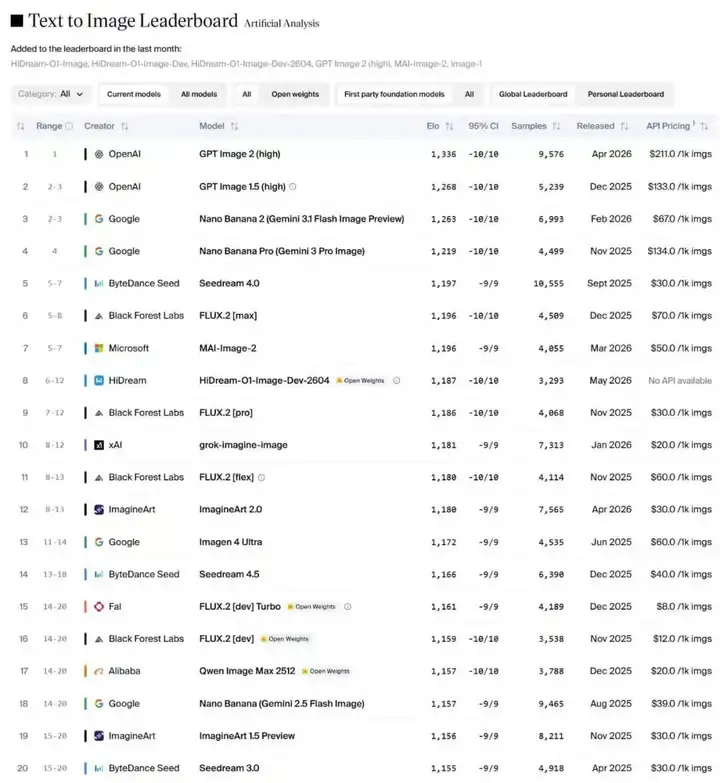
HiDream-O1-Image(代号:Peanut)在Artificial Analysis文本到图像竞技场中首次亮相即排名第8,超越Z-Image Turbo、Qwen-Image和FLUX.2 [Dev],成为当前领先的开源权重文本到图像模型(2026-5-5)。
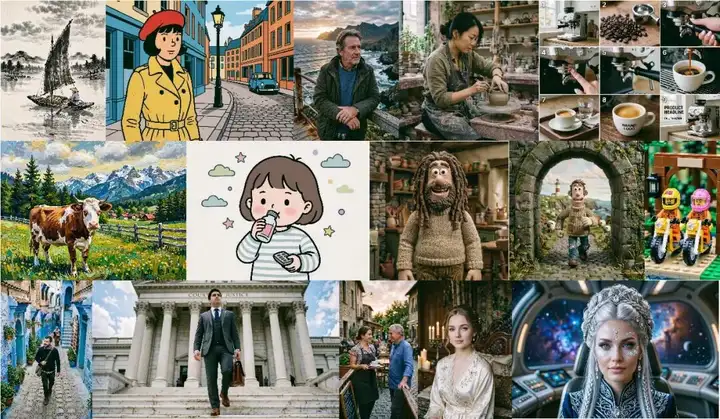
通用文本到图像生成
支持多种电影镜头语言、多样艺术风格和多面板故事板生成,分辨率最高达2,048×2,048。原生支持15种电影镜头和视角控制,涵盖远全景到特写的7种景别、高低角度等4种机位、以及正面到四分之三视角的4种朝向。
长文本渲染与布局控制
精准的多区域、多语言文本渲染能力,在CVTG-2K和LongText-Bench上达到或领先SOTA。支持海报、演示文稿、电商直播画面、信息图等复杂图文排版场景。

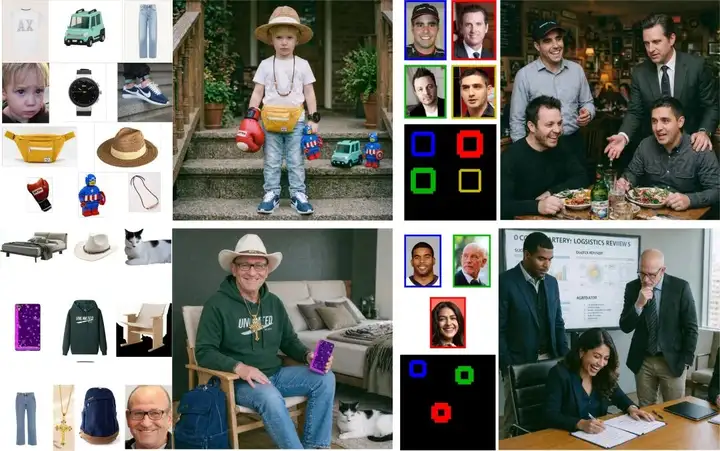
指令编辑与主体个性化
单一模型同时支持指令式图像编辑和主体驱动个性化生成。在UniSubject基准上,8B模型即在2-3主体、4-8主体和9-11主体三个配置中均取得强劲表现,200B+版本进一步超越GPT Image 2和Seedream-4.0。
模型架构
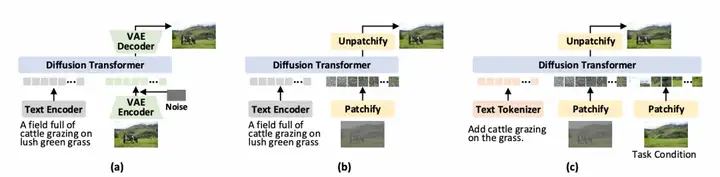
统一多模态token化
HiDream-O1-Image将所有输入统一编码为三种token类型:
- 文本Token:经提示代理精化后的文本指令,通过骨干网络的原生词表转换为离散token
- 条件Token:编辑源图或参考主体等条件图像,通过SigLip-2视觉编码器提取语义token,经可学习投影对齐到共享空间
- 生成Token:目标图像通过扩散过程构造噪声样本,分割为patch后经可学习patch嵌入映射到共享空间
三种token拼接后送入统一Transformer骨干进行联合上下文推理,最后通过线性预测头将输出token映射回干净图像patch。
混合统一注意力
条件token和文本token采用因果注意力,仅关注序列中前面的token,保持自回归特性。生成token采用全注意力,可关注所有token以捕获全局空间依赖。这一设计在统一Transformer中同时保留了语言建模的自回归结构和图像生成的空间一致性。
骨干网络
基于decoder-only Transformer架构,继承自大语言模型。8B版本从Qwen3-VL-8B-Instruct初始化,复用其多模态预对齐能力;200B+版本将像素级统一Transformer扩展至超过2000亿参数。两个版本均采用RMSNorm、SwiGLU和RoPE,扩散时间步编码为额外的特殊token。
训练目标
采用联合优化目标:Flow Matching损失用于图像预测,LPIPS损失和感知DINO损失提供感知监督,平衡结构回归与感知对齐。
训练流程
渐进式预训练(三阶段)
| 阶段 | 分辨率 | 训练任务 |
| 基础对齐 | 512×512 | T2I + 语言建模 + 多模态理解,大batch处理数十亿图文对 |
| 通才上下文学习 | 1024×1024 | 扩展至图像编辑和主体个性化,集成Prompt Agent推理 |
| 高保真精炼 | 2048×2048 | 超高分辨率子集精炼细节和感知质量 |
全阶段保留原始宽高比,支持灵活多分辨率生成。
后训练(两阶段)
- SFT:数十万高质量样本提升视觉美学和写实感,同步微调Prompt Agent的推理轨迹,将时间步采样从Logit-Normal改为均匀采样以增强后期去噪细节
- RLHF:采用GRPO,聚合OCR准确率、美学评分、指令遵循和推理质量等多维奖励信号
蒸馏加速(Dev版本)
HiDream-O1-Image-Dev通过对抗扩散蒸馏将推理步数从50步压缩至28步。采用DMD目标对齐学生与教师的轨迹分布,配合标准扩散损失和对抗损失联合优化,在保持感知保真度的同时大幅提升推理速度。
模型推理与训练
使用官方仓库推理
环境准备:
git clone https://github.com/HiDream-ai/HiDream-O1-Image.git
cd HiDream-O1-Image
pip install -r requirements.txt
建议安装flash-attn,如果您未安装(或无法安装)flash-attn,则必须编辑 models/pipeline.py 第 291 行,将 "use_flash_attn": True 改为 "use_flash_attn": False —— 否则推理时将因无法导入内核而失败。
模型推理:
文生图脚本:
python inference.py \
    --model_path /path/to/HiDream-O1-Image \
    --prompt "medium shot, eye-level, front view. A woman is seated in an ornate bedroom, illuminated by candlelight, with a calm and composed expression. The subject is a young woman with fair skin, light brown hair styled in an updo with loose tendrils framing her face, and blue eyes. She wears a cream-colored satin robe with delicate floral embroidery and lace trim along the neckline. Her ears are adorned with pearl drop earrings. She is seated on a bed with a dark, intricately carved wooden headboard. To her left, a wooden nightstand holds three lit white candles and a candelabra with multiple lit candles in the background. The bed is covered with patterned pillows and a dark, textured blanket. The walls are paneled with dark wood and feature a large, ornate tapestry with muted earth tones. The lighting creates soft highlights on her face and robe, with warm shadows cast across the room." \
    --output_image results/t2i.png \
    --height 2048 \
    --width 2048
单张图像编辑脚本:
python inference.py \
    --model_path /path/to/HiDream-O1-Image \
    --prompt "remove the earphones" \
    --ref_images assets/edit/test.jpg \
    --output_image results/edit.png \
    --keep_original_aspect
多张图的图像编辑脚本:
python inference.py \
    --model_path /path/to/HiDream-O1-Image \
    --prompt "A young boy with blonde hair stands on steps wearing light blue jeans, a white t-shirt with logo, and blue and white sneakers. He wears a brown cord necklace with beads, a black wristwatch with digital display, and carries a yellow fanny pack with white zipper. In his hand is a red boxing glove with white top, a teal plastic toy car, and a plastic toy figure of Captain America. He wears a straw hat with cream band. Natural light illuminates the scene." \
    --ref_images assets/IP/1.jpg assets/IP/2.jpg assets/IP/3.jpg assets/IP/4.jpg assets/IP/5.jpg assets/IP/6.jpg assets/IP/7.jpg assets/IP/8.jpg assets/IP/9.jpg assets/IP/10.jpg \
    --output_image results/subject.png
使用Diffsynth-Studio推理
环境安装:
git clone https://github.com/modelscope/DiffSynth-Studio.git
cd DiffSynth-Studio
pip install -e .
推理脚本(包含文生图和图生图):
import torch
from diffsynth.pipelines.hidream_o1_image import HiDreamO1ImagePipeline
from diffsynth.core.loader.config import ModelConfig
pipe = HiDreamO1ImagePipeline.from_pretrained(
    torch_dtype=torch.bfloat16,
    device="cuda",
    model_configs=[
        ModelConfig(model_id="HiDream-ai/HiDream-O1-Image", origin_file_pattern="model-*.safetensors"),
    ],
    processor_config=ModelConfig(model_id="HiDream-ai/HiDream-O1-Image", origin_file_pattern="./"),
)
image = pipe(
    prompt="medium shot, eye-level, front view. A woman is seated in an ornate bedroom, illuminated by candlelight, with a calm and composed expression. The subject is a young woman with fair skin, light brown hair styled in an updo with loose tendrils framing her face, and blue eyes. She wears a cream-colored satin robe with delicate floral embroidery and lace trim along the neckline. Her ears are adorned with pearl drop earrings. She is seated on a bed with a dark, intricately carved wooden headboard. To her left, a wooden nightstand holds three lit white candles and a candelabra with multiple lit candles in the background. The bed is covered with patterned pillows and a dark, textured blanket. The walls are paneled with dark wood and feature a large, ornate tapestry with muted earth tones. The lighting creates soft highlights on her face and robe, with warm shadows cast across the room.",
    negative_prompt=" ",
    cfg_scale=4.0,
    height=2048,
    width=2048,
    seed=42,
    num_inference_steps=50,
)
image.save("image.jpg")
image = pipe(
    prompt="change her clothes to blue",
    negative_prompt=" ",
    cfg_scale=4.0,
    height=2048,
    width=2048,
    seed=43,
    num_inference_steps=50,
    edit_image=[image],
)
image.save("image_edit.jpg")
使用Diffsynth-Studio训练LoRA模型
文生图LoRA训练:
modelscope download --dataset DiffSynth-Studio/diffsynth_example_dataset --include "hidream_o1_image/HiDream-O1-Image/*" --local_dir ./data/diffsynth_example_dataset
accelerate launch examples/hidream_o1_image/model_training/train.py \
  --dataset_base_path data/diffsynth_example_dataset/hidream_o1_image/HiDream-O1-Image \
  --dataset_metadata_path data/diffsynth_example_dataset/hidream_o1_image/HiDream-O1-Image/metadata.csv \
  --max_pixels 4194304 \
  --dataset_repeat 50 \
  --model_id_with_origin_paths "HiDream-ai/HiDream-O1-Image:model-*.safetensors" \
  --processor_config "HiDream-ai/HiDream-O1-Image:./" \
  --learning_rate 1e-4 \
  --num_epochs 5 \
  --lora_rank 32 \
  --remove_prefix_in_ckpt "pipe.dit." \
  --output_path "./models/train/HiDream-O1-Image_lora" \
  --lora_base_model "dit" \
  --lora_target_modules "q_proj,k_proj,v_proj,o_proj,gate_proj,up_proj,down_proj" \
  --use_gradient_checkpointing \
  --noise_scale 8.0
图像编辑LoRA训练:
modelscope download --dataset DiffSynth-Studio/diffsynth_example_dataset --include "qwen_image/Qwen-Image-Edit-2511/*" --local_dir ./data/diffsynth_example_dataset
accelerate launch examples/hidream_o1_image/model_training/train.py \
  --dataset_base_path data/diffsynth_example_dataset/qwen_image/Qwen-Image-Edit-2511 \
  --dataset_metadata_path data/diffsynth_example_dataset/qwen_image/Qwen-Image-Edit-2511/metadata.json \
  --data_file_keys "image,edit_image" \
  --extra_inputs "edit_image" \
  --max_pixels 4194304 \
  --dataset_repeat 50 \
  --model_id_with_origin_paths "HiDream-ai/HiDream-O1-Image:model-*.safetensors" \
  --processor_config "HiDream-ai/HiDream-O1-Image:./" \
  --learning_rate 1e-4 \
  --num_epochs 5 \
  --lora_rank 32 \
  --remove_prefix_in_ckpt "pipe.dit." \
  --output_path "./models/train/HiDream-O1-Image_lora" \
  --lora_base_model "dit" \
  --lora_target_modules "q_proj,k_proj,v_proj,o_proj,gate_proj,up_proj,down_proj" \
  --use_gradient_checkpointing \
  --noise_scale 8.0

ModelScope旨在打造下一代开源的模型即服务共享平台,为泛AI开发者提供灵活、易用、低成本的一站式模型服务产品,让模型应用更简单!
更多推荐



 0
0 0
0- 0


 已为社区贡献968条内容

所有评论(0)