
hugging face与modelscope下载模型与数据
方法1:使用 --cache-dir 指定下载目录方法2:使用 --local-dir 指定下载目录。
·
1. hugging face下载模型
方法1:使用 --cache-dir 指定下载目录
huggingface-cli download --cache-dir /your/custom/path MODEL_OR_DATASET_NAME
方法2:使用 --local-dir 指定下载目录
huggingface-cli download Qwen/Qwen3-1.7B --local-dir /data2/model_llm/Qwen3-1.7B
huggingface-cli download Qwen/Qwen2-0.5B-Instruct --local-dir /data2/model_llm/Qwen2-0.5B-Instruct
huggingface-cli download Qwen/Qwen2-1.5B-Instruct --local-dir /data2/model_llm/Qwen2-1.5B-Instruct
huggingface-cli download Qwen/Qwen2.5-3B --local-dir /data2/model_llm/Qwen2.5-3B
2. hugging face下载数据
2.1 使用 huggingface_hub 库
(1)下载整个仓库到指定目录
from huggingface_hub import snapshot_download

# 下载模型/数据集到自定义目录
snapshot_download(
    repo_id="模型或数据集ID",
    repo_type="dataset",  # 如果是数据集
    cache_dir="你的目录路径",  # 指定下载目录
    local_dir="你的目录路径",  # (新版本)直接保存到该目录,而非缓存
    local_dir_use_symlinks=False,  # 避免符号链接,直接复制文件
    resume_download=True  # 支持断点续传
)
示例:
#下载整个仓库到指定目录

from huggingface_hub import snapshot_download

output_path = "/data2/model_llm/datasets/ChnSentiCorp"
snapshot_download(
    repo_id="seamew/ChnSentiCorp",
    repo_type="dataset",  # 如果是数据集
    # cache_dir="你的目录路径",  # 指定下载目录
    local_dir=output_path,  # (新版本)直接保存到该目录,而非缓存
    local_dir_use_symlinks=False  # 避免符号链接,直接复制文件
)
(2)下载单个文件到指定路径
from huggingface_hub import hf_hub_download

file_path = hf_hub_download(
    repo_id="模型或数据集ID",
    filename="文件路径(如 config.json)",
    cache_dir="你的目录路径",  # 指定缓存目录
    local_dir="你的目录路径",  # (新版本)直接保存到目标目录
    force_filename="自定义文件名.txt"  # 可选:重命名文件
)
2.2 使用 datasets 库(仅数据集)
from datasets import load_dataset

# 下载数据集到指定目录
dataset = load_dataset(
    "数据集ID",
    cache_dir="你的目录路径",  # 指定缓存目录
    download_mode="force_redownload"  # 可选:强制重新下载
)
2.3 通过 Git 克隆到指定目录
git lfs install  # 确保安装 Git LFS
git clone https://huggingface.co/模型或数据集ID 你的目录路径
2.4 使用 wget 或 curl 直接下载
# 下载到当前目录(需替换 TOKEN 和 URL)
wget --header="Authorization: Bearer YOUR_TOKEN" \
     -O "你的目录路径/自定义文件名" \
     https://huggingface.co/模型或数据集ID/resolve/main/文件路径
示例:
git clone https://huggingface.co/datasets/openai/gsm8k /home/py_workspace/datasets/openai_gsm8k

git lfs clone https://huggingface.co/datasets/seamew/ChnSentiCorp

git lfs clone https://huggingface.co/datasets/Karsh-CAI/btfChinese-DPO-small
3. 搜索huggingface的模型与数据集
3.1 通过 Hugging Face 官网搜索
最直接的方法是访问官网的模型库和数据集库页面,使用搜索框筛选:
在搜索框中输入关键词(如 bert 、 text-classification ),并可以通过左侧的过滤器(如任务类型、框架、语言等)进一步筛选。
3.2 使用 huggingface_hub Python 库
如果需要在代码中搜索模型或数据集,可以使用 huggingface_hub 库的 list_models() 和 list_datasets() 方法。
安装库

pip install huggingface_hub

搜索模型

from huggingface_hub import list_models

# 搜索所有 BERT 相关模型
models = list_models(search="bert", limit=10)  # limit 限制返回数量

for model in models:
    print(f"Model ID: {model.id}")
    print(f"Task: {model.pipeline_tag}")  # 任务类型(如 text-classification)
    print(f"Downloads: {model.downloads}")  # 下载量
    print("---")

搜索数据集

from huggingface_hub import list_datasets

# 搜索所有文本分类数据集
datasets = list_datasets(search="text classification", limit=5)

for dataset in datasets:
    print(f"Dataset ID: {dataset.id}")
    print(f"Tags: {dataset.tags}")  # 任务类型
    print(f"Downloads: {dataset.downloads}")
    print("---")
示例:
$ python search_hf_2.py
Model ID: google-bert/bert-base-uncased
Task: fill-mask
Downloads: 48311761
---
Model ID: google-bert/bert-base-chinese
Task: fill-mask
Downloads: 3470669
---
$ python search_hf_data.py
Dataset ID: Karavet/ILUR-news-text-classification-corpus
Tags: ['task_categories:text-classification', 'multilinguality:monolingual', 'language:hy', 'license:apache-2.0', 'size_categories:100K<n<1M', 'format:text', 'modality:text', 'library:datasets', 'library:mlcroissant', 'region:us']
Downloads: 320
---
Dataset ID: jakeazcona/short-text-labeled-emotion-classification
Tags: ['size_categories:10K<n<100K', 'format:parquet', 'modality:text', 'library:datasets', 'library:pandas', 'library:mlcroissant', 'library:polars', 'region:us']
Downloads: 40
---3.3 使用 Hugging Face API(REST)
import requests

# 搜索模型
url = "https://huggingface.co/api/models"
params = {"search": "bert", "limit": 5}
response = requests.get(url, params=params).json()

for model in response:
    print(model["modelId"])
4. modelscope下载模型
https://modelscope.cn/docs/intro/environment-setup
from modelscope import snapshot_download

# 下载模型到自定义目录(不存缓存)
model_dir = snapshot_download(
    "damo/nlp_structbert_sentence-similarity_chinese-base",
    cache_dir="/your/custom/pache/path",  # 可选:修改缓存目录
    local_dir="/your/target/directory",    # 直接下载到目标目录
    local_dir_use_symlinks=False,         # 禁用符号链接(直接复制文件)
)
参数说明:
cache_dir :修改缓存目录(默认 ~/.cache/modelscope/hub )
local_dir :直接下载到目标目录(推荐)
local_dir_use_symlinks=False :避免软链接,直接存储文件
5. modelscope下载数据
pip install datasets==2.8.0 modelscope==1.4.0 -i https://pypi.tuna.tsinghua.edu.cn/simple

pip install pyarrow==11.0.0 -i https://pypi.tuna.tsinghua.edu.cn/simple
from modelscope.msdatasets import MsDataset
# 下载数据集到指定目录
dataset = MsDataset.load(
"clue/afqmc",
subset_name="default",
split="train",
cache_dir="/your/custom/dataset/path", # 修改数据集缓存目录
)
print(dataset)import os
from modelscope.msdatasets import MsDataset
# 创建目录(如果不存在)
cache_dir = "/data2/data/refcoco"
os.makedirs(cache_dir, exist_ok=True)
try:
# 下载并加载数据集
dataset = MsDataset.load(
"swift/refcoco",
subset_name="default",
split="train",
cache_dir=cache_dir,
download_mode="reuse_dataset_if_exists"
)
# 打印信息
print(f"数据集类型: {type(dataset)}")
print(f"样本数量: {len(dataset)}")
if len(dataset) > 0:
print("首条样本:", dataset[0])
except Exception as e:
print("加载数据集失败:", e)# 导入所需的库
from modelscope.msdatasets import MsDataset
import os
import pandas as pd
MAX_DATA_NUMBER = 500
# 创建目录(如果不存在)
cache_dir = "/data2/data/coco_2014_caption"
os.makedirs(cache_dir, exist_ok=True)
# 检查目录是否已存在
if not os.path.exists('coco_2014_caption'):
# 从modelscope下载COCO 2014图像描述数据集
ds = MsDataset.load(
'modelscope/coco_2014_caption',
subset_name='coco_2014_caption',
split='train',
cache_dir=cache_dir,
trust_remote_code=True)
print(len(ds))
# 设置处理的图片数量上限
total = min(MAX_DATA_NUMBER, len(ds))
# 创建保存图片的目录
os.makedirs('coco_2014_caption', exist_ok=True)
# 初始化存储图片路径和描述的列表
image_paths = []
captions = []
for i in range(total):
# 获取每个样本的信息
item = ds[i]
image_id = item['image_id']
caption = item['caption']
image = item['image']
# 保存图片并记录路径
image_path = os.path.abspath(f'coco_2014_caption/{image_id}.jpg')
image.save(image_path)
# 将路径和描述添加到列表中
image_paths.append(image_path)
captions.append(caption)
# 每处理50张图片打印一次进度
if (i + 1) % 50 == 0:
print(f'Processing {i+1}/{total} images ({(i+1)/total*100:.1f}%)')
# 将图片路径和描述保存为CSV文件
df = pd.DataFrame({
'image_path': image_paths,
'caption': captions
})
# 将数据保存为CSV文件
df.to_csv('./coco-2024-dataset.csv', index=False)
print(f'数据处理完成,共处理了{total}张图片')
else:
print('coco_2014_caption目录已存在,跳过数据处理步骤')6. 使用 modelscope-cli 命令行工具
下载模型(默认缓存目录)

modelscope-cli download damo/nlp_structbert_sentence-similarity_chinese-base
例子1:
modelscope download --dataset 'Tongyi-DataEngine/SA1B-Dense-Caption' --include 'data/train-000*' --local_dir '/data2/data/SA1B-Dense-Caption'
例子2:
modelscope download --dataset AI-ModelScope/LaTeX_OCR --local_dir /data2/data/LaTeX_OCR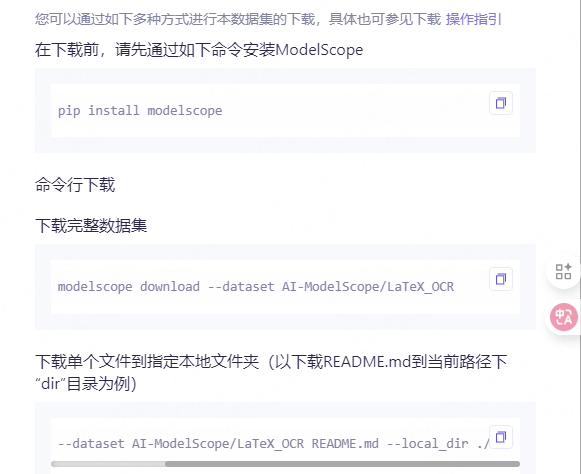
7. modelscope所需环境
需要dataset==3.6.0,使用2.19.0时会报错
name: llmtuner
channels:
  - https://mirrors.tuna.tsinghua.edu.cn/anaconda/pkgs/main
  - defaults
dependencies:
  - _libgcc_mutex=0.1=main
  - _openmp_mutex=5.1=1_gnu
  - bzip2=1.0.8=h5eee18b_6
  - ca-certificates=2025.2.25=h06a4308_0
  - ld_impl_linux-64=2.40=h12ee557_0
  - libffi=3.4.4=h6a678d5_1
  - libgcc-ng=11.2.0=h1234567_1
  - libgomp=11.2.0=h1234567_1
  - libstdcxx-ng=11.2.0=h1234567_1
  - libuuid=1.41.5=h5eee18b_0
  - ncurses=6.4=h6a678d5_0
  - openssl=3.0.16=h5eee18b_0
  - pip=25.1=pyhc872135_2
  - python=3.10.16=he870216_1
  - readline=8.2=h5eee18b_0
  - sqlite=3.45.3=h5eee18b_0
  - tk=8.6.14=h39e8969_0
  - xz=5.6.4=h5eee18b_1
  - zlib=1.2.13=h5eee18b_1
  - pip:
    - absl-py==2.3.1
    - accelerate==1.8.1
    - addict==2.4.0
    - aiofiles==24.1.0
    - aiohappyeyeballs==2.6.1
    - aiohttp==3.12.13
    - aiosignal==1.4.0
    - airportsdata==20250622
    - aliyun-python-sdk-core==2.16.0
    - aliyun-python-sdk-kms==2.16.5
    - annotated-types==0.7.0
    - antlr4-python3-runtime==4.9.3
    - anyio==4.9.0
    - astor==0.8.1
    - asttokens==3.0.0
    - async-timeout==5.0.1
    - attrdict==2.0.1
    - attrs==25.3.0
    - auto-gptq==0.7.1
    - autoawq==0.2.9
    - av==15.1.0
    - binpacking==1.5.2
    - bitsandbytes==0.46.1
    - blake3==1.0.5
    - boto3==1.38.36
    - botocore==1.38.36
    - brotli==1.2.0
    - cachetools==6.1.0
    - cbor2==5.7.0
    - certifi==2025.6.15
    - cffi==2.0.0
    - charset-normalizer==3.4.2
    - click==8.1.8
    - clip==1.0
    - cloudpickle==3.1.1
    - colorama==0.4.6
    - colorlog==6.10.1
    - comm==0.2.2
    - compressed-tensors==0.10.2
    - contourpy==1.3.2
    - cpm-kernels==1.0.11
    - crcmod==1.7
    - cryptography==46.0.3
    - cupy-cuda12x==13.4.1
    - cycler==0.12.1
    - dacite==1.9.2
    - datasets==3.6.0
    - debugpy==1.8.14
    - decorator==5.2.1
    - decord==0.6.0
    - deepseek-sft-63==0.1
    - depyf==0.19.0
    - dill==0.3.8
    - diskcache==5.6.3
    - distro==1.9.0
    - dnspython==2.7.0
    - docstring-parser==0.17.0
    - dotenv==0.9.9
    - einops==0.8.1
    - email-validator==2.2.0
    - et-xmlfile==2.0.0
    - evalscope==1.2.0
    - evaluate==0.4.6
    - exceptiongroup==1.2.2
    - executing==2.2.0
    - fastapi==0.115.14
    - fastapi-cli==0.0.7
    - fastrlock==0.8.3
    - ffmpy==1.0.0
    - filelock==3.18.0
    - fire==0.7.1
    - fonttools==4.57.0
    - frozenlist==1.7.0
    - fsspec==2025.3.0
    - ftfy==6.3.1
    - func-timeout==4.3.5
    - future==1.0.0
    - fuzzywuzzy==0.18.0
    - gekko==1.3.0
    - gguf==0.16.2
    - google-auth==2.43.0
    - google-genai==1.50.1
    - googleapis-common-protos==1.70.0
    - gradio==5.49.1
    - gradio-client==1.13.3
    - groovy==0.1.2
    - grpcio==1.73.1
    - h11==0.14.0
    - h5py==3.15.1
    - hf-xet==1.1.5
    - httpcore==1.0.8
    - httptools==0.6.4
    - httpx==0.28.1
    - huggingface-hub==0.34.4
    - human-eval==1.0.3
    - idna==3.10
    - imageio==2.37.2
    - immutabledict==4.2.2
    - importlib-metadata==8.7.0
    - iniconfig==2.1.0
    - interegular==0.3.3
    - ipdb==0.13.13
    - ipykernel==6.29.5
    - ipython==8.37.0
    - jedi==0.19.2
    - jieba==0.42.1
    - jinja2==3.1.6
    - jiter==0.9.0
    - jmespath==0.10.0
    - joblib==1.5.2
    - json-repair==0.53.0
    - json5==0.12.1
    - jsonlines==4.0.0
    - jsonschema==4.24.0
    - jsonschema-specifications==2025.4.1
    - jupyter-client==8.6.3
    - jupyter-core==5.8.1
    - kiwisolver==1.4.8
    - langdetect==1.0.9
    - lark==1.2.2
    - latex2sympy2-extended==1.10.2
    - levenshtein==0.27.3
    - llama-cpp-python==0.3.9
    - llguidance==0.7.30
    - llmcompressor==0.6.0
    - llvmlite==0.44.0
    - lm-format-enforcer==0.10.11
    - loguru==0.7.3
    - lxml==6.0.2
    - markdown==3.10
    - markdown-it-py==3.0.0
    - markupsafe==3.0.2
    - matplotlib==3.10.1
    - matplotlib-inline==0.1.7
    - mdurl==0.1.2
    - mistral-common==1.8.4
    - mmengine-lite==0.10.7
    - modelscope==1.31.0
    - mpmath==1.3.0
    - ms-opencompass==0.1.6
    - ms-swift==3.10.1
    - ms-vlmeval==0.0.18
    - msgpack==1.1.1
    - msgspec==0.19.0
    - multidict==6.6.3
    - multiprocess==0.70.16
    - nest-asyncio==1.6.0
    - networkx==3.4.2
    - ninja==1.11.1.4
    - nltk==3.9.2
    - numba==0.61.2
    - numpy==1.26.4
    - nvidia-cublas-cu12==12.6.4.1
    - nvidia-cuda-cupti-cu12==12.6.80
    - nvidia-cuda-nvrtc-cu12==12.6.77
    - nvidia-cuda-runtime-cu12==12.6.77
    - nvidia-cudnn-cu12==9.5.1.17
    - nvidia-cufft-cu12==11.3.0.4
    - nvidia-cufile-cu12==1.11.1.6
    - nvidia-curand-cu12==10.3.7.77
    - nvidia-cusolver-cu12==11.7.1.2
    - nvidia-cusparse-cu12==12.5.4.2
    - nvidia-cusparselt-cu12==0.6.3
    - nvidia-ml-py==12.575.51
    - nvidia-nccl-cu12==2.26.2
    - nvidia-nvjitlink-cu12==12.6.85
    - nvidia-nvtx-cu12==12.6.77
    - ollama==0.4.8
    - omegaconf==2.3.0
    - openai==1.101.0
    - openai-harmony==0.0.4
    - opencc==1.1.9
    - opencv-python==4.11.0.86
    - opencv-python-headless==4.11.0.86
    - openpyxl==3.1.5
    - opentelemetry-api==1.34.1
    - opentelemetry-exporter-otlp==1.34.1
    - opentelemetry-exporter-otlp-proto-common==1.34.1
    - opentelemetry-exporter-otlp-proto-grpc==1.34.1
    - opentelemetry-exporter-otlp-proto-http==1.34.1
    - opentelemetry-proto==1.34.1
    - opentelemetry-sdk==1.34.1
    - opentelemetry-semantic-conventions==0.55b1
    - opentelemetry-semantic-conventions-ai==0.4.9
    - optimum==1.26.1
    - orjson==3.11.4
    - oss2==2.19.1
    - outlines==0.1.11
    - outlines-core==0.2.10
    - overrides==7.7.0
    - packaging==25.0
    - pandas==2.3.1
    - parso==0.8.4
    - partial-json-parser==0.2.1.1.post6
    - peft==0.16.0
    - pexpect==4.9.0
    - pillow==11.2.1
    - platformdirs==4.3.8
    - pluggy==1.5.0
    - portalocker==3.2.0
    - prettytable==3.16.0
    - prometheus-client==0.20.0
    - prometheus-fastapi-instrumentator==7.1.0
    - prompt-toolkit==3.0.51
    - propcache==0.3.2
    - protobuf==5.29.5
    - psutil==7.0.0
    - ptyprocess==0.7.0
    - pure-eval==0.2.3
    - py-cpuinfo==9.0.0
    - pyarrow==20.0.0
    - pyasn1==0.6.1
    - pyasn1-modules==0.4.2
    - pybase64==1.4.2
    - pycountry==24.6.1
    - pycparser==2.22
    - pycryptodome==3.23.0
    - pydantic==2.11.7
    - pydantic-core==2.33.2
    - pydantic-extra-types==2.10.5
    - pydub==0.25.1
    - pyecharts==2.0.8
    - pygments==2.19.1
    - pylatexenc==2.10
    - pynvml==12.0.0
    - pyparsing==3.2.3
    - pypinyin==0.55.0
    - pytest==8.3.5
    - python-dateutil==2.9.0.post0
    - python-dotenv==1.1.1
    - python-json-logger==3.3.0
    - python-levenshtein==0.27.3
    - python-multipart==0.0.20
    - pytz==2025.2
    - pyyaml==6.0.2
    - pyzmq==27.0.0
    - qwen-vl-utils==0.0.8
    - qwen2p5-vl-sft-63==0.1
    - rank-bm25==0.2.2
    - rapidfuzz==3.14.3
    - ray==2.48.0
    - referencing==0.36.2
    - regex==2024.11.6
    - requests==2.32.4
    - rich==14.0.0
    - rich-toolkit==0.14.7
    - rouge==1.0.1
    - rouge-chinese==1.0.3
    - rouge-score==0.1.2
    - rpds-py==0.25.1
    - rsa==4.9.1
    - ruff==0.14.5
    - s3transfer==0.13.0
    - sacrebleu==2.5.1
    - safehttpx==0.1.7
    - safetensors==0.5.3
    - scikit-learn==1.7.2
    - scipy==1.15.3
    - seaborn==0.13.2
    - semantic-version==2.10.0
    - sentence-transformers==5.1.2
    - sentencepiece==0.2.0
    - setproctitle==1.3.6
    - setuptools==80.9.0
    - shellingham==1.5.4
    - simplejson==3.20.1
    - six==1.17.0
    - sniffio==1.3.1
    - sortedcontainers==2.4.0
    - soundfile==0.13.1
    - soxr==0.5.0.post1
    - stack-data==0.6.3
    - starlette==0.46.2
    - sty==1.0.6
    - swankit==0.2.3
    - swanlab==0.6.3
    - sympy==1.14.0
    - tabulate==0.9.0
    - tenacity==9.1.2
    - tensorboard==2.20.0
    - tensorboard-data-server==0.7.2
    - termcolor==3.1.0
    - threadpoolctl==3.6.0
    - tiktoken==0.9.0
    - timeout-decorator==0.5.0
    - timm==1.0.22
    - tokenizers==0.22.1
    - tomli==2.2.1
    - tomlkit==0.13.3
    - torch==2.7.1
    - torchaudio==2.7.1
    - torchvision==0.22.1
    - tornado==6.5.1
    - tqdm==4.67.1
    - traitlets==5.14.3
    - transformers==4.57.1
    - transformers-stream-generator==0.0.5
    - triton==3.3.1
    - trl==0.24.0
    - typer==0.15.2
    - typing-extensions==4.14.1
    - typing-inspection==0.4.0
    - tzdata==2025.2
    - urllib3==2.5.0
    - uvicorn==0.35.0
    - uvloop==0.21.0
    - validators==0.35.0
    - vl-learning==0.1
    - vllm==0.10.1.1
    - watchfiles==1.1.0
    - wcwidth==0.2.13
    - websockets==15.0.1
    - werkzeug==3.1.3
    - wget==3.2
    - wheel==0.45.1
    - word2number==1.1
    - wrapt==1.17.2
    - xformers==0.0.31
    - xgrammar==0.1.21
    - xlsxwriter==3.2.9
    - xxhash==3.5.0
    - yapf==0.43.0
    - yarl==1.20.1
    - zipp==3.23.0
    - zstandard==0.23.0
prefix: /data2/anaconda3/envs/llmtuner
参考文献:

ModelScope旨在打造下一代开源的模型即服务共享平台,为泛AI开发者提供灵活、易用、低成本的一站式模型服务产品,让模型应用更简单!
更多推荐



 3
3 0
0- 0


 已为社区贡献1条内容

所有评论(0)