
modelscope安装
·
1.环境
https://modelscope.cn/docs/intro/environment-setup
pip install “modelscope[cv]” -f https://modelscope.oss-cn-beijing.aliyuncs.com/releases/repo.html
//可能报torch没有,则需要先安装torch:https://pytorch.org/选择配置后安装。
//可能报torch_scatter安装失败(pip也安装不上),在安装torch后,从https://data.pyg.org/whl/中选
//择torch版本,进入后选择torch_scatter对应的cpu/gpu、win/linux等版本信息,下载后安装。
//再进行安装modelscope
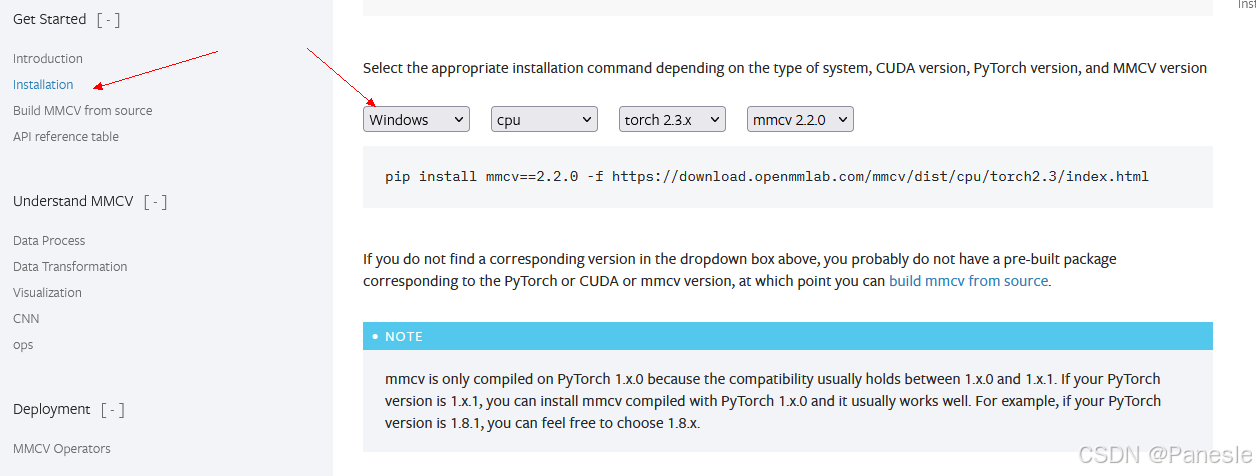
//mmcv安装报错,可以去官网下载来安装https://mmcv.readthedocs.io/en/latest/get_started/installation.html,或在官网配置条件获得安装指令,如下图。当安装时报错版本范围问题,可以直接修改指令中mmcv的版本重新安装。安装出错可以考虑直接调整mmcv到底版本:pip install mmcv==1.7 -f https://download.openmmlab.com/mmcv/dist/cu121/torch2.4/index.html

ModelScope旨在打造下一代开源的模型即服务共享平台,为泛AI开发者提供灵活、易用、低成本的一站式模型服务产品,让模型应用更简单!
更多推荐


 7
7 0
0- 0


 已为社区贡献1条内容

所有评论(0)