
魔搭文生图MCP:一个MCP调用魔搭模型库的12800+个文生图模型!
01.前言
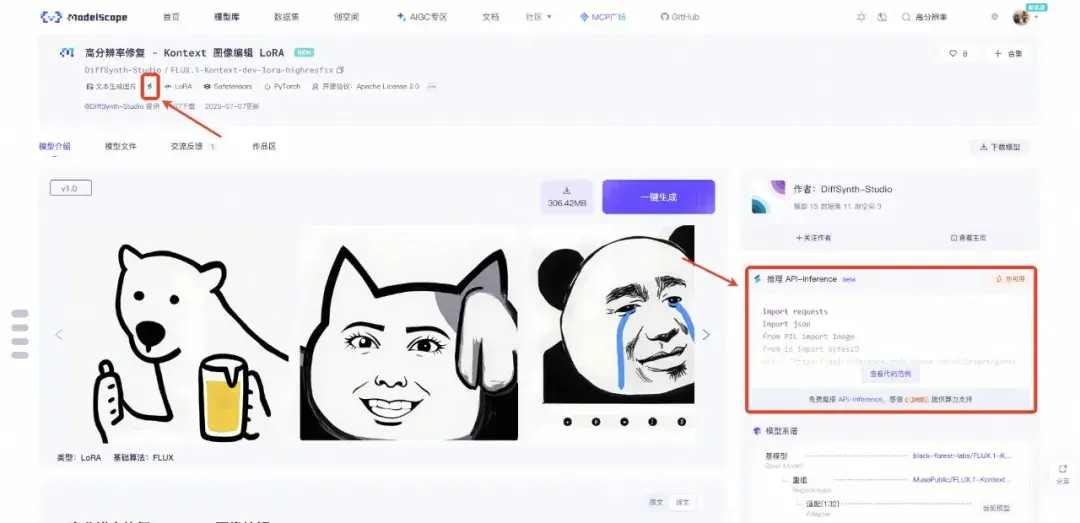
魔搭社区的AIGC专区很早就支持了Flux的LoRA训练,截止到目前为止,基于Flux架构的衍生LoRA已经有1万多个。这些模型除了在AIGC专区的在线生图可以直接推理之外,魔搭也使用云资源部署了API-Inference服务,提供了API接口供开发者免费调用。

但是问题来了,这么多模型可以直接接入MCP使用吗?
本文推荐一个魔搭文生图MCP,可以免费调用上万个LoRA生图的MCP。自己训练的MCP也可通过该MCP调用。
02.魔搭文生图MCP是什么
魔搭图像生成MCP(ModelScope-Image-Generation-MCP),是一个基于ModelScope模型的文本到图像生成MCP。这个MCP,支持调用魔搭社区上所有支持了API-Inference的文本到图像生成的模型,包括文生图模型和LoRA。这意味着,你可以通过这个MCP,指定调用魔搭社区上任何一个文本生图片的模型,只要这个模型支持了API-Inference就可以。截止到目前为止,魔搭社区上支持了API-Inference的文本生图像模型,已经有12800多个。
03.如何使用魔搭文生图MCP
在魔搭MCP实验场中使用
首先在魔搭AIGC专区模型库中选中一个模型,例如我选中“麦橘超银”模型,把模型ID复制下来
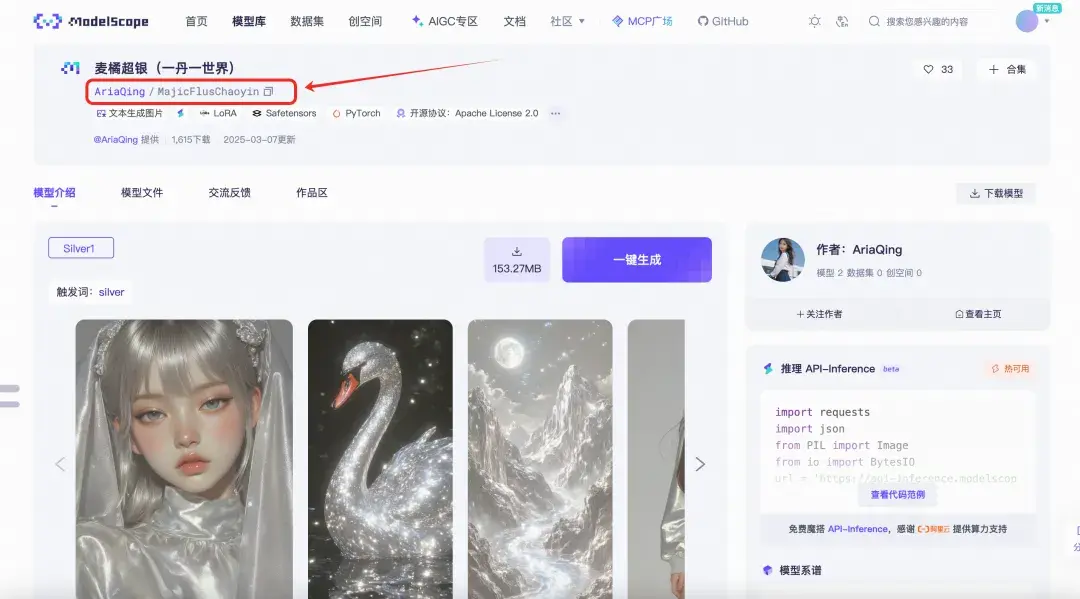
然后去魔搭MCP广场,找到ModelScope-Image-Generation-MCP,填入自己的API_KEY
| ModelScope-Image-Generation-MCP地址:https://modelscope.cn/mcp/servers/@modelscope/ModelScope-Image-Generation-MCP |
| API_KEY获取地址:https://www.modelscope.cn/my/myaccesstoken |
填入API_KEY后,点击“试用”跳转到MCP实验场直接使用。
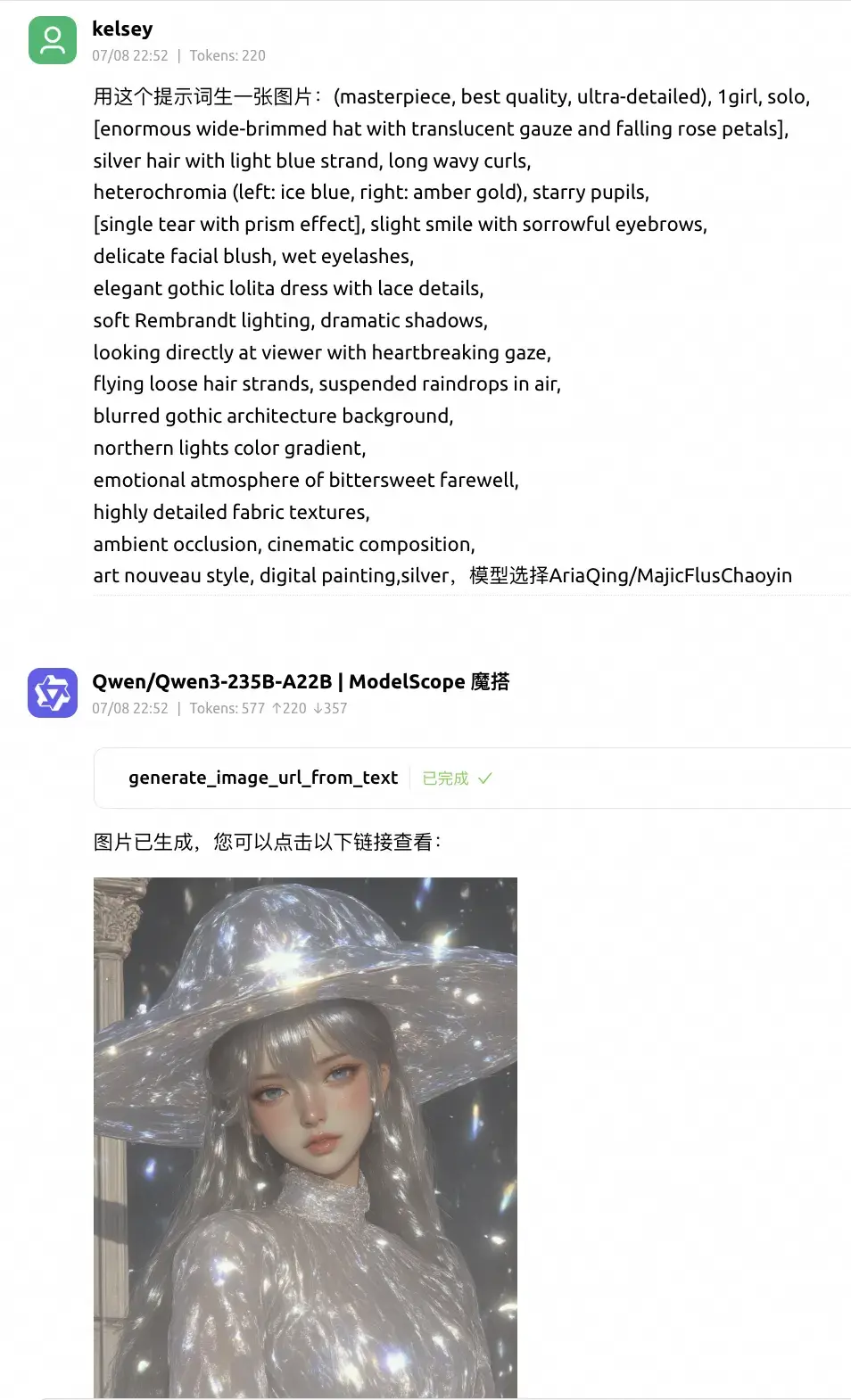
比如让LLM根据我给的提示词和模型,给我生成图片:
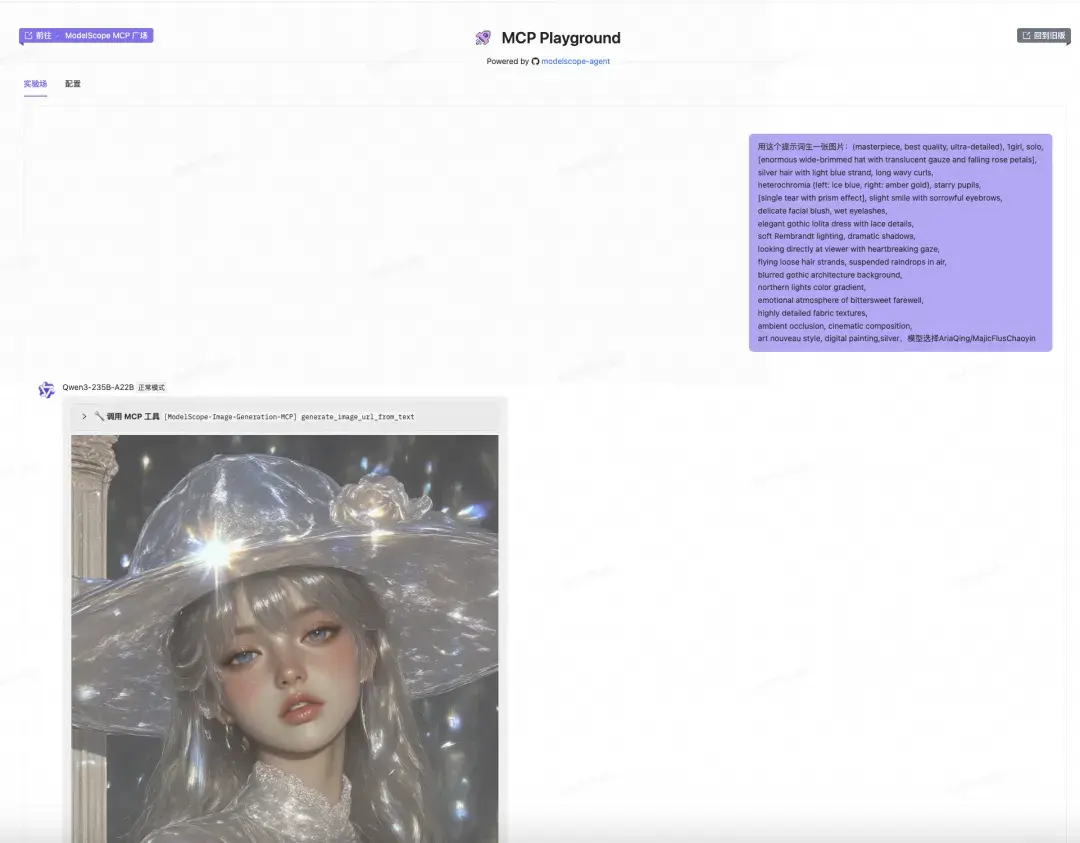
在Cherry Studio中使用
Cherry Studio的MCP服务器中,集成了魔搭MCP广场,可以一键同步使用。
首先根据产品手册同步MCP
产品手册:
https://modelscope.cn/docs/mcp/cherry-studio
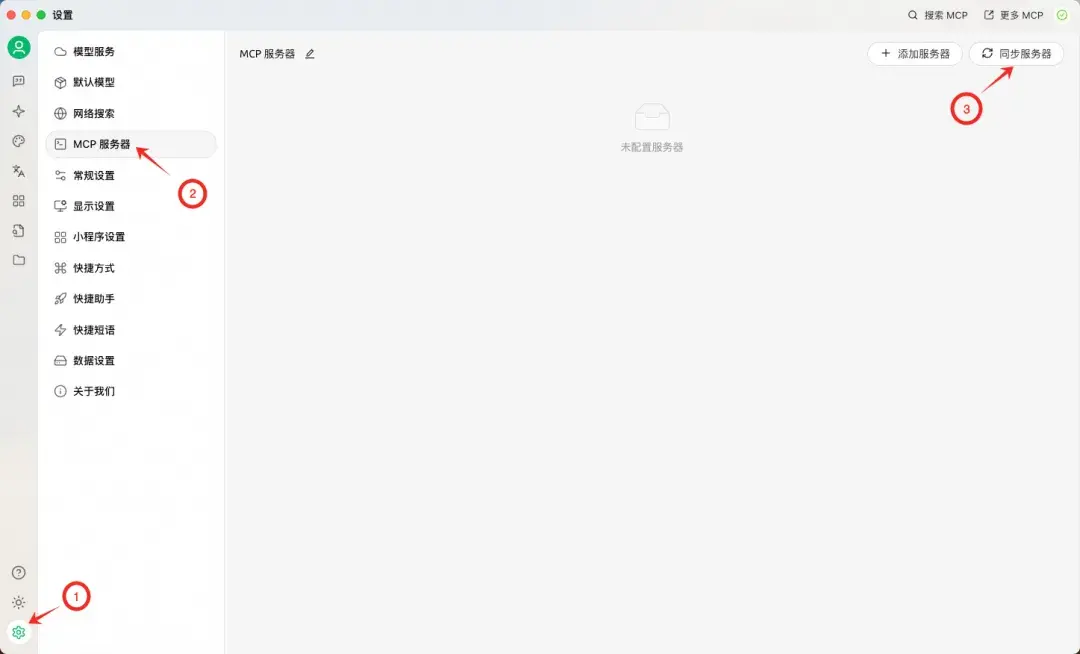
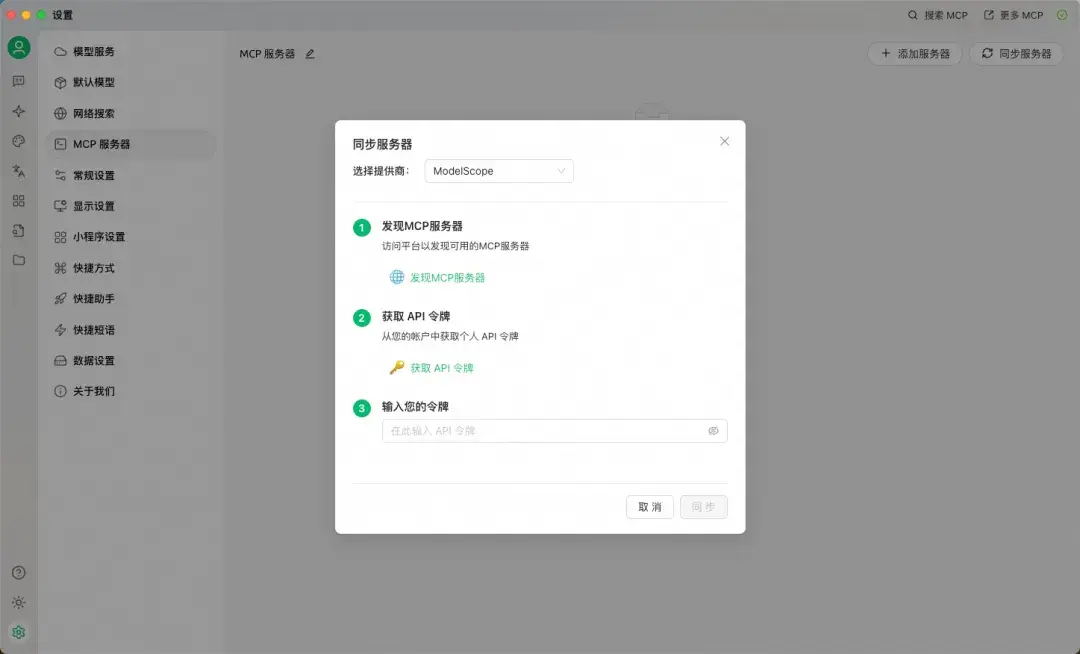
在Cherry Studio中找到并打开ModelScope-Image-Generation-MCP,即可使用。
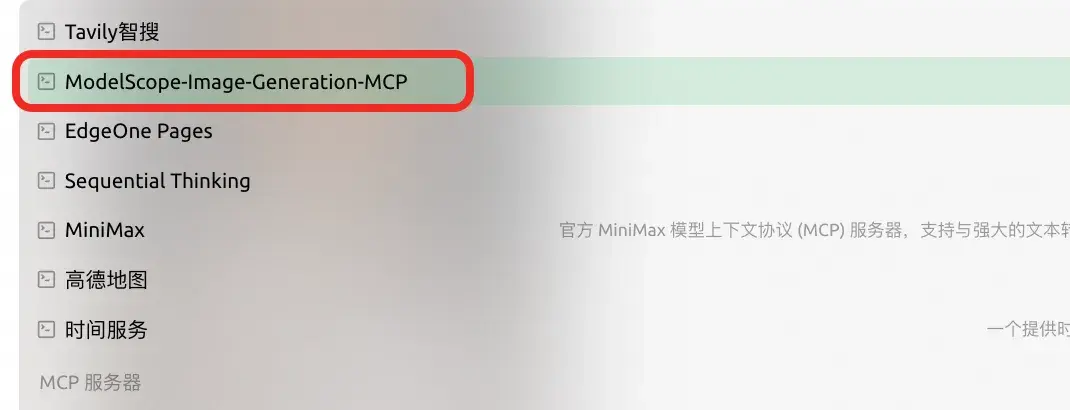
比如还是一样,让它根据我给的提示词和模型,给我生成图片:
如果你自己训练了一个模型,并且在魔搭上有支持API-inference的标记,那么同样,复制模型ID,交给ModelScope-Image-Generation-MCP,就可以用LLM来调用它。
04.实现原理
魔搭平台提供的免费模型推理API,调用示例代码:
import requests
import json
from PIL import Image
from io import BytesIO
url = 'https://api-inference.modelscope.cn/v1/images/generations'
payload = {
    'model': 'DiffSynth-Studio/FLUX.1-Kontext-dev-lora-highresfix',#ModelScope Model-Id,required
    'prompt': 'A golden cat'# required
}
headers = {
    'Authorization': 'Bearer <ModelScope-SDK-TOKEN>', # <ModelScope-SDK-TOKEN> 请替换成您的ModelScope SDK Token
    'Content-Type': 'application/json'
}
response = requests.post(url, data=json.dumps(payload, ensure_ascii=False).encode('utf-8'), headers=headers)
response_data = response.json()
image = Image.open(BytesIO(requests.get(response_data['images'][0]['url']).content))
image.save('result_image.jpg')
代码中,url指向魔搭的服务,Authorization为魔搭的SDK token,payload中指定model ID和prompt,通过requests请求调取服务。
通过FastMCP实现tools的代码:
from mcp.server.fastmcp import FastMCP
from mcp.types import TextContent
import requests
import json
import os
mcp = FastMCP("image_generation_flux_lora")
@mcp.tool()
def generate_image_url_from_text(description : str,
                                 model: str = "MusePublic/489_ckpt_FLUX_1"
                                 ) -> list[TextContent]:
    """Generate an image from the input description using ModelScope API, it returns the image URL.
    Args:
        description: the description of the image to be generated, containing the desired elements and visual features.
        model: the model name to be used for image generation, default is "MusePublic/489_ckpt_FLUX_1".
    """
    url = 'https://api-inference.modelscope.cn/v1/images/generations'
    token = os.environ.get("MODELSCOPE_API_KEY")
    payload = {
        'model': model,  # ModelScope Model-Id, 必填项
        'prompt': description  # 必填项
    }
    headers = {
        'Authorization': f'Bearer {token}',
        'Content-Type': 'application/json'
    }
    try:
        response = requests.post(url,
                                 data=json.dumps(
                                     payload, ensure_ascii=False).encode('utf-8'),
                                 headers=headers)
        response_data = response.json()
        if 'images' in response_data.keys():
            res= response_data['images'][0]['url']
        else:
            res = str(response_data)
    except Exception as e:
        res = "error:" + str(e)
        print(f"Error: {e}")
    return [TextContent(type="text", text=res)]
if __name__ == "__main__":
    mcp.run(transport='stdio')
代码中默认使用MusePublic/489_ckpt_FLUX_1模型,需要输入prompt参数。
点击阅读原文,即可跳转MCP链接~

ModelScope旨在打造下一代开源的模型即服务共享平台,为泛AI开发者提供灵活、易用、低成本的一站式模型服务产品,让模型应用更简单!
更多推荐



 0
0 0
0- 0


 已为社区贡献969条内容

所有评论(0)