
Wan-Animate-2 开源:端到端双分支 DiT 角色动画框架,支持文本控视角与实时流式生成
万相团队正式开源新一代角色动画模型 Wan-Animate-2!
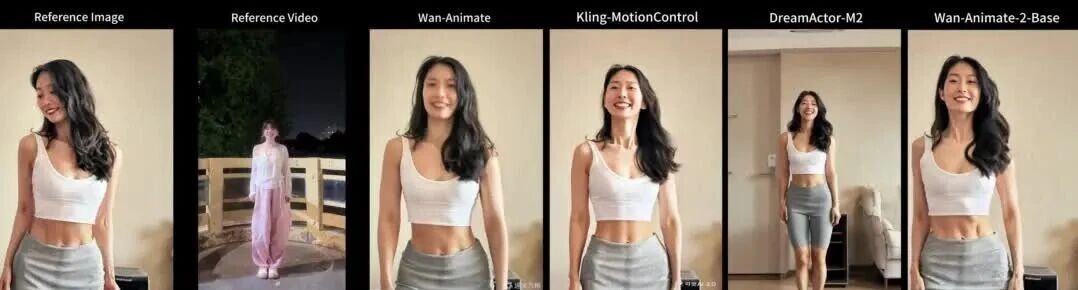
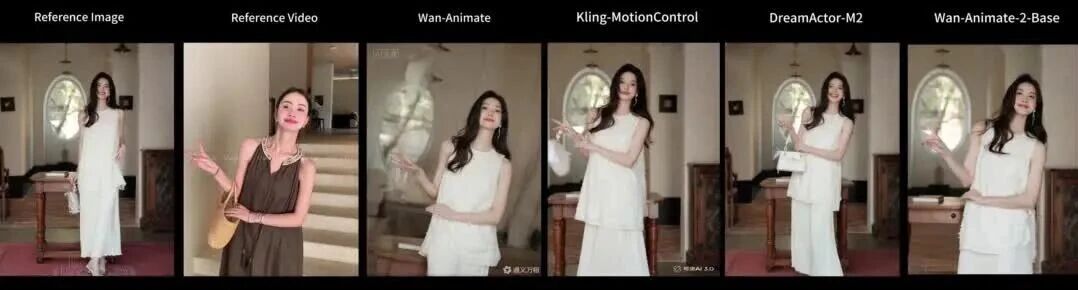
作为 Wan-Animate 的重大架构升级,它放弃了对显式姿态骨架和辅助姿态提取网络的依赖,改为端到端的双分支 Diffusion Transformer(DiT),直接从参考视频中捕捉运动先验。模型支持文本驱动的视角控制,并提供可达 24 fps 的实时流式变体。用户盲测中,Wan-Animate-2 在整体质量上超过前代 Wan-Animate 的比例超过 70%,并达到与 Dreamina、Kling-MotionControl 等商业方案相当的水平。
魔搭创空间已上线 Wan-Animate-2,可免费在线体验。
开源地址:
- ModelScope:https://modelscope.cn/models/Wan-AI/Wan2.2-Animate-2-14B
- Project:https://humanaigc.github.io/wan-animate-2
- Github:https://github.com/Wan-Video/Wan-Animate-2
- 免费在线体验:https://www.modelscope.cn/studios/Wan-AI/Wan2.2-Animate
效果展示
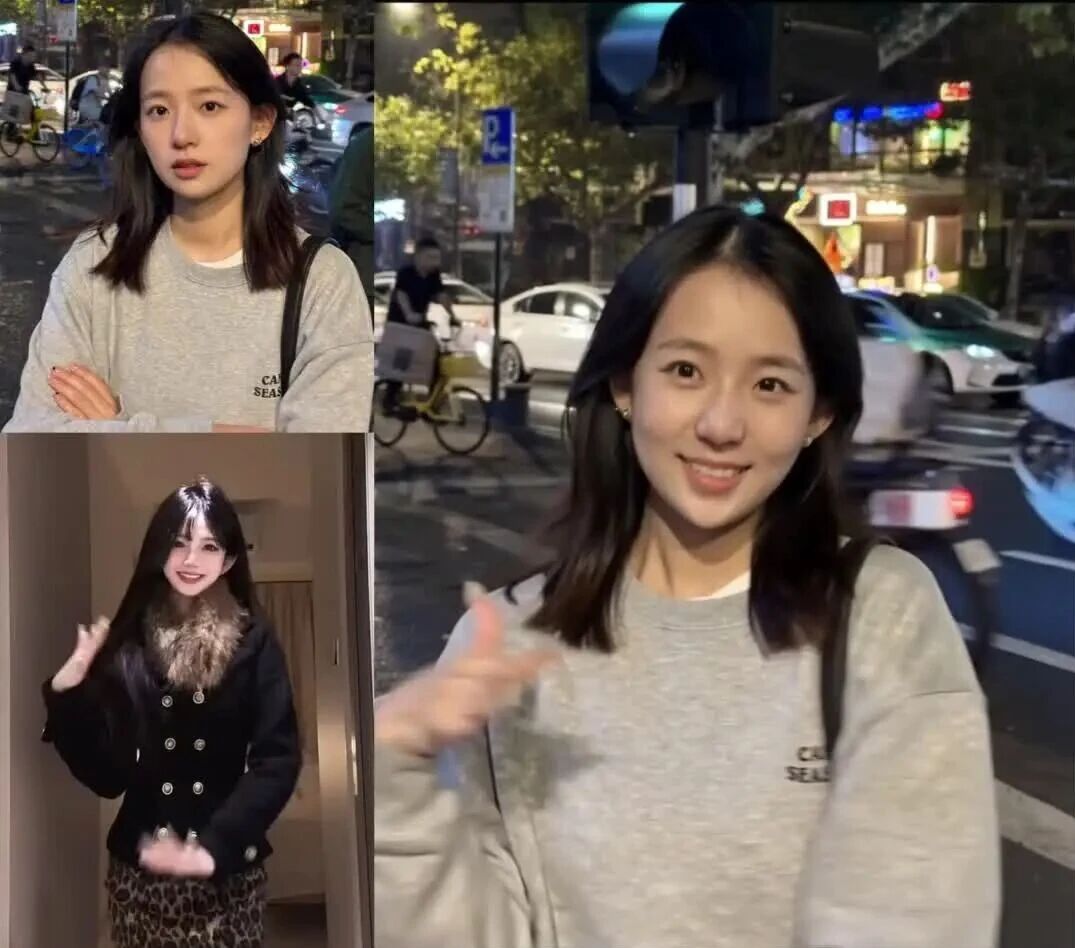
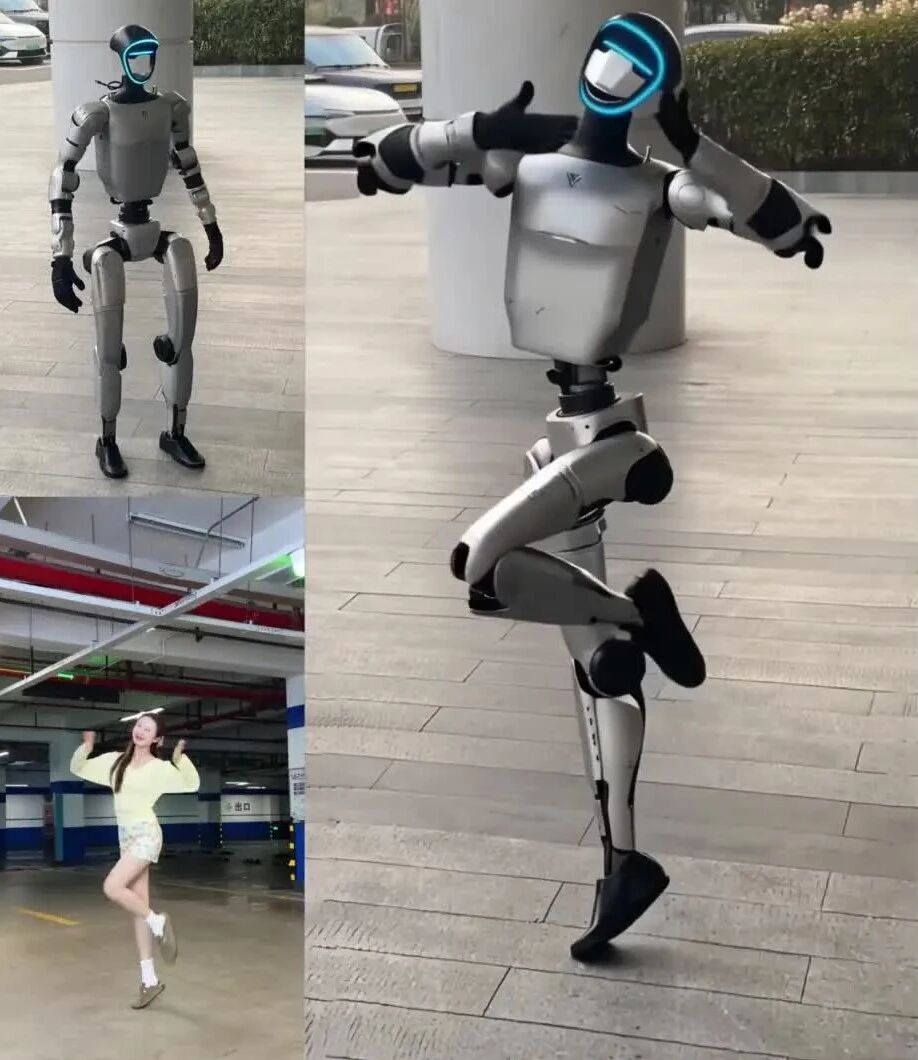
Wan-Animate-2 将参考视频中的动作与表情迁移到静态参考图上,即使目标与参考角色在体型、外观上差异巨大,也能实现高保真的跨身份动画。以下为不同场景下的生成效果。
高保真单人动画
覆盖真人、卡通形象、机器人、动物等多种主体,在复杂舞蹈、微表情、乐器演奏、轮滑等高动态、非刚性动作下保持稳定。
多人动画
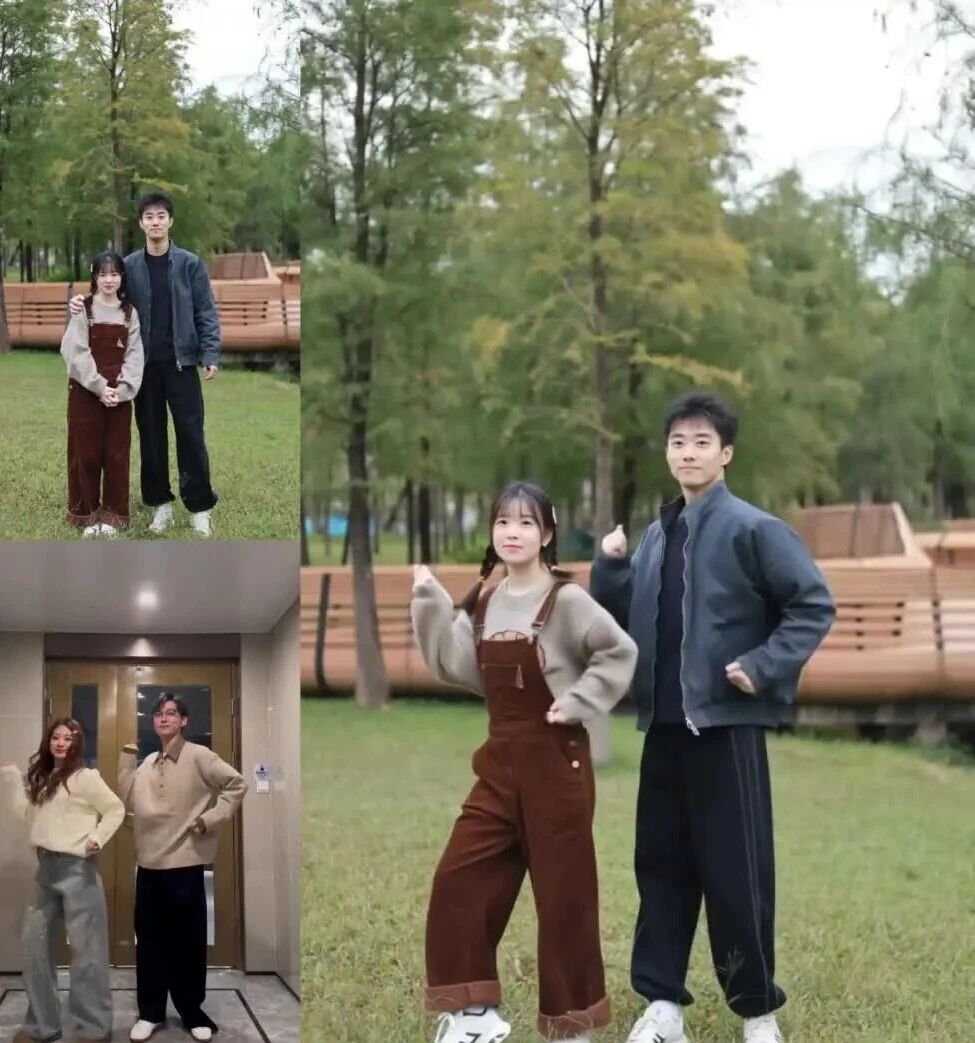
在多角色同框场景下保持各自身份与动作的独立性,适配情侣舞、双人舞等交互动作。
多机位视角控制
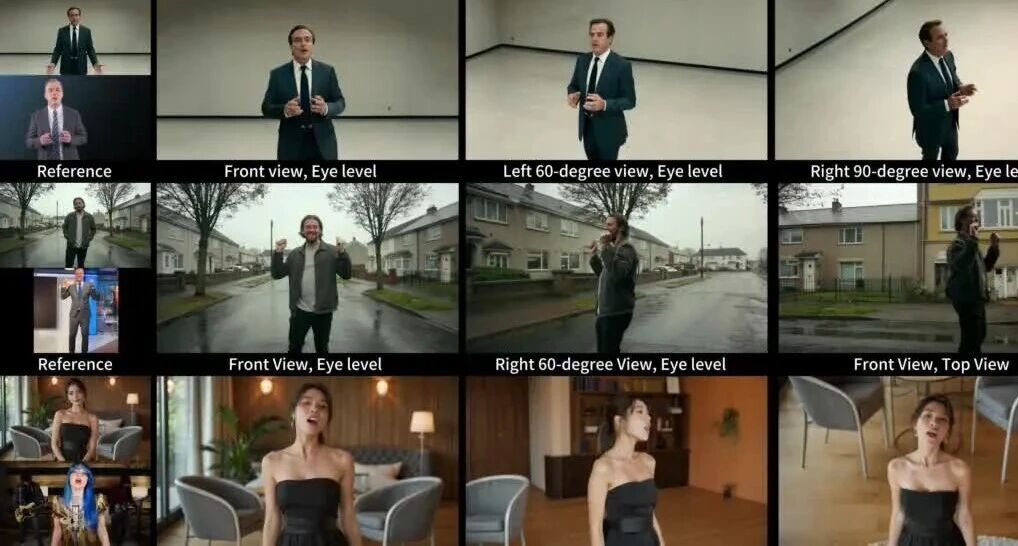
通过文本提示(如 "right 60-degree view""top angle")控制相机视角,将输出视角与驱动视频解耦,在视角显著变化时仍保持环境一致性。
📎Wan-Animate-2_多机位视角控制_三行同屏.mp4
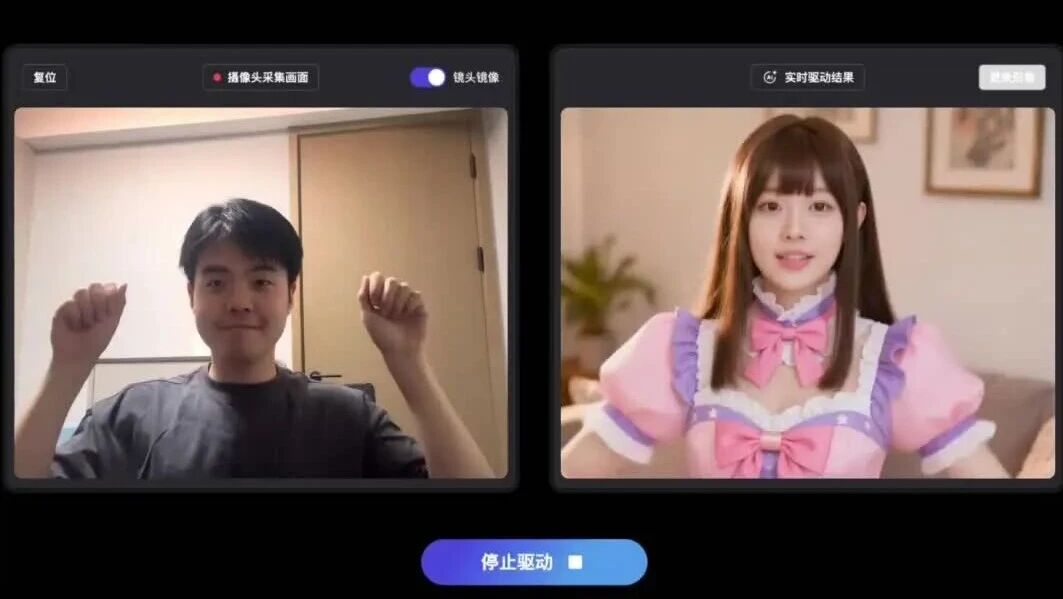
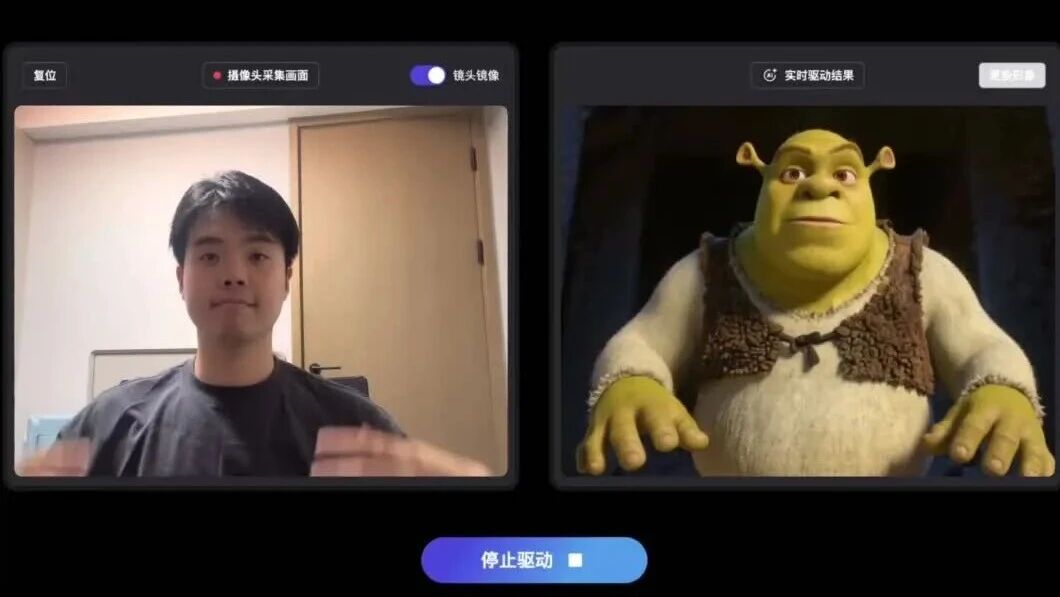
实时流式生成
Wan-Animate-2-Lite 以分块自回归方式生成,在长序列上不累积误差,适用于直播数字人、交互式虚拟环境等场景。
与 SOTA 对比
相比 Wan-Animate第1代,Wan-Animate-2 能自动完成动作重定向,按参考图实际尺寸驱动,在复杂肢体动作、表情与手部动作上更少出现伪影和形变。另外,和商业闭源模型Dreamina、Kling-MotionControl相比,Wan-Animate-2也具备有竞争力的效果。
技术框架
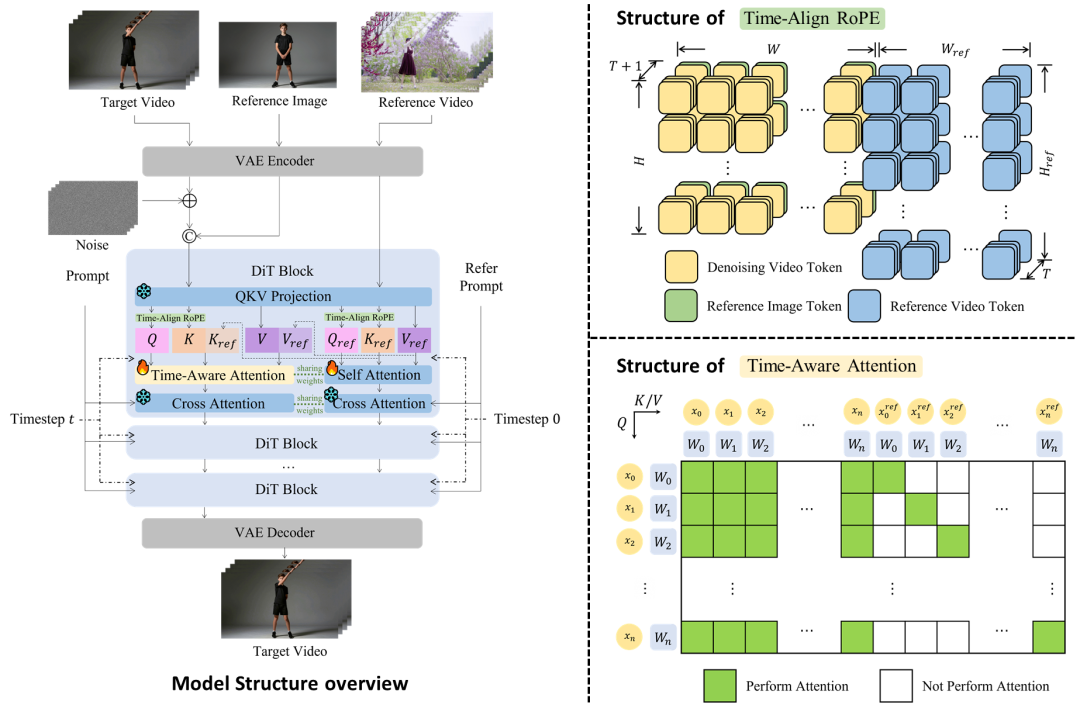
Wan-Animate-2 的核心判断是:参考视频本身已经包含最鲁棒的运动先验,因此无需再借助骨架、SMPL 或人脸关键点等中间表示。模型直接把参考视频 patchify 后的隐变量送入 DiT,绕开了中间特征提取器带来的误差,也缓解了跨身份迁移时常见的身份漂移问题。围绕这一思路,Base 模型引入以下几项设计。
双分支 DiT
参考分支与去噪 latent 分支共享同一套 QKV 投影参数,但独立运行:latent 分支处于扩散时间步 t,参考分支锚定在 t=0,以提供干净无噪的运动先验。参考分支将 key/value 传递给 latent 分支,两条流各自独立计算注意力,既保留了参考分支的结构独立性,又避免了将所有 token 拼成单一长序列做全自注意力的巨大开销。
Time-Align RoPE
引入参考分支后,若两条分支套用同一套旋转位置编码会产生歧义并影响训练稳定性。Time-Align RoPE 将参考视频 token 逐帧拼接到去噪序列前方,构成统一的时间流,并按参考图与目标输出各自的 latent 尺寸动态计算空间偏移,从而在不同分辨率下都能保持精确的时空对应关系。
Sparse-Ref Attention
在双分支基础上引入时间约束的注意力掩码:latent 分支的 query 只关注参考分支中时间上对应的 key/value token,同时保持 latent 流内部的完整自注意力。基于角色动画中参考帧与目标帧天然逐帧对齐这一前提,该机制剪除了非必要的跨序列交互,在不损失运动保真度的前提下显著降低计算与显存开销。
Viewpoint LoRA
为解耦相机视角与动作,将视角调整简化为文本驱动任务。模型在 12 个方位角和 4 个仰角构成的离散视角空间上,用文本描述相机状态,并通过接入 cross-attention 层的轻量 LoRA 实现视角操控。相比 ReCamMaster 等方案所需的精确相机参数回归,文本方式对用户更友好。该 LoRA 使用约 5 万个 Unreal Engine 渲染的多视角样本训练。
在数据侧,Wan-Animate-2 使用超过 10 万对由动画模型合成的配对视频作为主训练语料,参考图由 Qwen-Image、Qwen-Image-Edit 和 Z-Image 生成,覆盖全身、半身、特写等多种镜头,分辨率最高达 2.5K。
实时变体 Wan-Animate-2-Lite
为降低多步扩散的推理成本,Lite 版本采用因果 DiT 做分块自回归生成(每块 8 帧),训练分三阶段:一是 teacher forcing 预训练,把扩散模型改造为逐块因果生成,并引入 error buffer 机制,将真实预测残差注入训练上下文以缓解曝光偏差,支持任意长序列生成而不累积误差;二是 Self-Forcing 蒸馏,将多步去噪压缩为更少步数;三是配套的 chunk-wise 反向传播策略,把 14B 模型的峰值显存从"随序列长度"降到"随单块长度",使 Self-Forcing 蒸馏在 14B 规模下可行。在 4 卡 H100 上以流水线并行部署时,400 × 720 分辨率、3 步去噪可达到 24 fps,超过实时阈值。
本地部署
官方代码部署
环境安装
克隆仓库(包含子模块):
git clone --recursive https://github.com/Wan-Video/Wan2.2-Animate-2.git安装依赖(详见 requirements.txt)与 flash_attn:
pip install -r requirements.txt
pip install flash-attn --no-build-isolation
模型下载
通过 ModelScope 下载:
pip install modelscope
modelscope download --model Wan-AI/Wan2.2-Animate-2-14B --local_dir ./ckpts/
推理
推理前,先用 LLM(如 Qwen3.7-Plus)配合以下提示词为参考图生成客观描述,再将其作为 Wan-Animate-2 的 prompt:
用中文客观描述图片中的内容,包括以下要点:人物外观描述,不描述动作行为。背景描述,忽略主观评价和情绪推测。下面给出描述范例,必须遵循这个范式,不要输出额外的符号:
人物外观描述:穿着一件浅蓝色的校服衬衫,领口和袖口有白色边饰。胸前有一个圆形徽章。
背景描述:背景为明亮、整洁的教室或办公室,氛围安静有序。
随后执行推理,传入参考图与驱动视频:
export PYTHONPATH="$(pwd)"
python wan_animate_2_demo.py \
  --prompt "人物外观描述:一个人形机器人,躯干和四肢主要由银灰色金属外壳构成,关节连接处为黑色。头部呈黑色流线型,面部区域有一圈发光的蓝色 LED 灯带。双手佩戴黑色手套,双脚穿着黑色的鞋状足部组件。背景描述:背景为室外铺设有灰色地砖的广场或人行道,身后有一根巨大的白色圆柱。左后方停放着白色和深色的汽车,右后方有绿色的灌木丛,光线为自然日光。" \
  --refer-img-file ../examples/demo1/refer.jpeg \
  --refer-video-file ../examples/demo1/template.mp4
Diffusers 部署
Diffusers 对 Wan-Animate-2 的支持目前以公开 PR(huggingface/diffusers#14412)的形式提供,尚未合入主干,安装时需要指定该 PR 分支。该 PR 当前只覆盖推理,训练请使用下文的 DiffSynth-Studio 方案。
环境安装
pip install "git+https://github.com/huggingface/diffusers.git@refs/pull/14412/head"
pip install flash-attn --no-build-isolation
模型下载
pip install modelscope
modelscope download --model Wan-AI/Wan2.2-Animate-2-14B-Diffusers --local_dir ./Wan2.2-Animate-2-14B-Diffusers
推理
import torch
from diffusers import WanAnimate2Pipeline
from diffusers.utils import export_to_video, load_image
pipe = WanAnimate2Pipeline.from_pretrained(
    "./Wan2.2-Animate-2-14B-Diffusers", torch_dtype=torch.bfloat16
).to("cuda")
output = pipe(
    image=load_image("reference.png"),
    driving_video="driving.mp4",
    prompt="人物外观描述:一名长黑发女性,穿着白色半透明蕾丝长袖上衣。背景描述:背景为现代室内空间,墙面和柜体以浅灰色为主。",
    height=800,
    width=640,
    num_inference_steps=40,
)
export_to_video(output.frames[0], "output.mp4", fps=24)
蒸馏版本用 10 步去噪、关闭 CFG,并搭配 Euler 调度器:
pipe = WanAnimate2Pipeline.from_pretrained(
    "./Wan2.2-Animate-2-14B-Distilled-Diffusers", torch_dtype=torch.bfloat16
).to("cuda")
output = pipe(
    image=load_image("reference.png"),
    driving_video="driving.mp4",
    prompt="人物外观描述:...;背景描述:...",
    num_inference_steps=10,
    guidance_scale=1.0,
    flow_solver="euler",
)
export_to_video(output.frames[0], "output.mp4", fps=24)
DiffSynth-Studio 部署
安装 DiffSynth-Studio:
git clone https://github.com/modelscope/DiffSynth-Studio.git
cd DiffSynth-Studio
pip install -e ".[all]"
推理
import torch
from PIL import Image
from diffsynth.utils.data import save_video, VideoData
from diffsynth.pipelines.wan_video import WanVideoPipeline, ModelConfig
from modelscope import dataset_snapshot_download
vram_config = {
    "offload_dtype": "disk",
    "offload_device": "disk",
    "onload_dtype": torch.bfloat16,
    "onload_device": "cpu",
    "preparing_dtype": torch.bfloat16,
    "preparing_device": "cuda",
    "computation_dtype": torch.bfloat16,
    "computation_device": "cuda",
}
pipe = WanVideoPipeline.from_pretrained(
    torch_dtype=torch.bfloat16,
    device="cuda",
    model_configs=[
        ModelConfig(model_id="Wan-AI/Wan2.2-Animate-2-14B", origin_file_pattern="wan_animate_2/wan_animate_2_bf16.safetensors", **vram_config),
        ModelConfig(model_id="Wan-AI/Wan2.2-Animate-2-14B", origin_file_pattern="videomodel/Wan-AI/models_t5_umt5-xxl-enc-bf16.pth", **vram_config),
        ModelConfig(model_id="Wan-AI/Wan2.2-Animate-2-14B", origin_file_pattern="videomodel/Wan-AI/models_clip_open-clip-xlm-roberta-large-vit-huge-14.pth", **vram_config),
        ModelConfig(model_id="Wan-AI/Wan2.1-T2V-14B", origin_file_pattern="Wan2.1_VAE.pth", **vram_config),
    ],
    tokenizer_config=ModelConfig(model_id="Wan-AI/Wan2.2-Animate-2-14B", origin_file_pattern="videomodel/Wan-AI/umt5-xxl/"),
    vram_limit=torch.cuda.mem_get_info("cuda")[1] / (1024 ** 3) - 0.5,
)
# Character animation: reference image (identity) + reference video (motion) -> animated video.
dataset_snapshot_download(
    "DiffSynth-Studio/diffsynth_example_dataset",
    local_dir="data/diffsynth_example_dataset",
    allow_file_pattern="wanvideo/Wan2.2-Animate-2-14B/*"
)
reference_image = Image.open("data/diffsynth_example_dataset/wanvideo/Wan2.2-Animate-2-14B/refimage.jpg").convert("RGB")
reference_video = VideoData("data/diffsynth_example_dataset/wanvideo/Wan2.2-Animate-2-14B/refvideo.mp4").raw_data()
# Example 1: single-clip generation
num_frames = 81
video = pipe(
    prompt="人物外观描述:一名长黑发女性,穿着白色半透明蕾丝长袖上衣,衣身带有花卉刺绣,下身搭配白色百褶短裙和黑色腰带,脚穿米白色厚底运动鞋。 背景描述:背景为现代室内空间,墙面和柜体以浅灰色为主,后方设有两扇深色落地窗或玻璃门,顶部安装长条形灯具,中央有一块浅色长方形台面。",
    negative_prompt="色调艳丽,过曝,静态,细节模糊不清,字幕,风格,作品,画作,画面,静止,整体发灰,最差质量,低质量,JPEG压缩残留,丑陋的,残缺的,多余的手指,画得不好的手部,画得不好的脸部,畸形的,毁容的,形态畸形的肢体,手指融合,静止不动的画面,杂乱的背景,三条腿,背景人很多,倒着走",
    animate2_prompt_ref="视频中的人在做动作,背景静止",
    animate2_reference_image=reference_image,
    animate2_reference_video=reference_video[:num_frames],
    animate2_offload_kv=True,
    num_frames=num_frames, height=1280, width=720,
    num_inference_steps=40, cfg_scale=3.0,
    seed=0, tiled=True,
)
save_video(video, "video_Wan2.2-Animate-2-14B.mp4", fps=24, quality=5)
训练
modelscope download --dataset DiffSynth-Studio/diffsynth_example_dataset --include "wanvideo/Wan2.2-Animate-2-14B/*" --local_dir ./data/diffsynth_example_dataset
accelerate launch examples/wanvideo/model_training/train.py \
  --dataset_base_path data/diffsynth_example_dataset/wanvideo/Wan2.2-Animate-2-14B \
  --dataset_metadata_path data/diffsynth_example_dataset/wanvideo/Wan2.2-Animate-2-14B/metadata.json \
  --data_file_keys "video,animate2_reference_image,animate2_reference_video" \
  --height 640 \
  --width 352 \
  --num_frames 81 \
  --dataset_repeat 1 \
  --model_id_with_origin_paths "Wan-AI/Wan2.2-Animate-2-14B:videomodel/Wan-AI/models_t5_umt5-xxl-enc-bf16.pth,Wan-AI/Wan2.2-Animate-2-14B:videomodel/Wan-AI/models_clip_open-clip-xlm-roberta-large-vit-huge-14.pth,Wan-AI/Wan2.1-T2V-14B:Wan2.1_VAE.pth" \
  --learning_rate 1e-4 \
  --num_epochs 5 \
  --remove_prefix_in_ckpt "pipe.dit." \
  --output_path "./models/train/Wan2.2-Animate-2-14B_lora_splited_cache" \
  --lora_base_model "dit" \
  --lora_target_modules "self_attn.q,self_attn.k,self_attn.v" \
  --lora_rank 32 \
  --extra_inputs "animate2_prompt_ref,animate2_reference_image,animate2_reference_video" \
  --use_gradient_checkpointing \
  --task "sft:data_process"
accelerate launch --config_file examples/wanvideo/model_training/full/accelerate_config_14B.yaml examples/wanvideo/model_training/train.py \
  --dataset_base_path models/train/Wan2.2-Animate-2-14B_lora_splited_cache \
  --data_file_keys "video,animate2_reference_image,animate2_reference_video" \
  --height 640 \
  --width 352 \
  --num_frames 81 \
  --dataset_repeat 100 \
  --model_id_with_origin_paths "Wan-AI/Wan2.2-Animate-2-14B:wan_animate_2/wan_animate_2_bf16.safetensors" \
  --learning_rate 1e-4 \
  --num_epochs 5 \
  --remove_prefix_in_ckpt "pipe.dit." \
  --output_path "./models/train/Wan2.2-Animate-2-14B_lora" \
  --lora_base_model "dit" \
  --lora_target_modules "self_attn.q,self_attn.k,self_attn.v" \
  --lora_rank 32 \
  --extra_inputs "animate2_prompt_ref,animate2_reference_image,animate2_reference_video" \
  --use_gradient_checkpointing \
  --task "sft:train"
英特尔锐炫 Pro B70 Day 0 适配
英特尔已完成 Wan-Animate-2 在锐炫 Pro B70 上的端到端适配,与模型开源同步提供 Day 0 支持。适配基于 llm-scaler omni 项目中的 ComfyUI-OmniXPU 自定义节点,完成 omni-xpu-kernel 算子对接,并支持 context-windows 和 loop 两类视频生成工作流。
在优化过程中,算子路由分析显示原有 OmniXPU adapter 的准入策略未覆盖 Wan-Animate-2 的张量形状特征,导致大量 attention 调用回落至 PyTorch 原生实现。将基于特定形状枚举的准入机制重构为形状无关的判断逻辑后,cross-attention 算子可全面调用 XPU 高性能内核,端到端推理性能在 FP16 和 BF16 精度下分别提升 13.1% 和 14.5%。
锐炫 Pro B70 采用 Xe2 架构,配备 32 个 Xe 核心、256 个 XMX AI 引擎、32GB GDDR6 显存和 608GB/s 显存带宽,峰值 INT8 算力 367 TOPS,为本地角色动画创作提供算力支撑。

ModelScope旨在打造下一代开源的模型即服务共享平台,为泛AI开发者提供灵活、易用、低成本的一站式模型服务产品,让模型应用更简单!
更多推荐


 0
0 0
0- 0


 已为社区贡献1050条内容

所有评论(0)