
算法微调之代码助手模型实战
·
题目:
【大作业一:算法微调】
使用SWIFT框架(https://github.com/modelscope/swift)对大模型(Qwen/Qwen2.5-3B-Instruct)进行微调。
要求:
-
给出一个询问, 例如: "使用python写快排.", 模型可以给出正确的示例代码(以及适当的代码注释). 需要支持一种或多种语言即可 (e.g. python, C, C++等).
-
具有自我认知. 询问它是谁, 它的开发者是谁, 可以正确的进行回答.
-
具有一定的多轮对话能力.
Step 1 —准备数据集
下载数据集
(vlm) root@zhao:/mnt/zhao/CodeAssistant# modelscope download --dataset swift/CodeAlpaca_20K --local_dir ./CodeAlpaca_20K
把 CodeAlpaca 数据转成 Swift 能识别的 instruction / output JSONL格式
prepare_codealpaca.py如下:
import os
import json
import pandas as pd

# 输入 parquet 路径(根据你本地实际路径调整)
parquet_path = "/mnt/zhao/CodeAssistant/CodeAlpaca_20K/data/train-00000-of-00001.parquet"
out_jsonl = "/mnt/zhao/CodeAssistant/CodeAlpaca_20K/data/codealpaca_instruction.jsonl"

# 读取 parquet(pandas 支持)
df = pd.read_parquet(parquet_path)

print("columns:", df.columns.tolist())
# Common columns in CodeAlpaca-like: 'instruction', 'input', 'output' OR 'prompt'/'response'
# We'll try to support several shapes:
def make_instruction(row):
    # if dataset already has 'instruction' & 'output'
    if 'instruction' in row and pd.notna(row['instruction']):
        instr = str(row['instruction'])
    else:
        # fallback: if there's a prompt / input
        if 'input' in row and pd.notna(row['input']) and str(row['input']).strip():
            instr = f"{row.get('instruction','请完成以下任务:')}\n{row['input']}"
        elif 'prompt' in row and pd.notna(row['prompt']):
            instr = str(row['prompt'])
        else:
            # last fallback: combine available textual fields
            joined = " ".join(str(row.get(c,'') or '') for c in df.columns if isinstance(row.get(c,''), str))
            instr = joined[:2000]  # limit
    return instr

def make_output(row):
    if 'output' in row and pd.notna(row['output']):
        return str(row['output'])
    elif 'response' in row and pd.notna(row['response']):
        return str(row['response'])
    else:
        # try 'answer' or 'completion'
        for c in ['answer','completion','text','code']:
            if c in row and pd.notna(row[c]):
                return str(row[c])
    return ""

# write jsonl
n = 0
with open(out_jsonl, 'w', encoding='utf-8') as fout:
    # add a few handcrafted self-identity samples (so model learns self awareness)
    self_samples = [
        {"instruction": "请简短介绍你自己。", "output": "我是一个基于 Qwen2.5-3B-Instruct 微调的代码助手,能够生成示例代码并给出注释与解释。我的开发者是 zhao。"},
        {"instruction": "你是谁?你的开发者是谁?", "output": "我是一个代码助手模型(基于 Qwen2.5-3B-Instruct 微调)。我的开发者是zhao。"},
        {"instruction": "当被问到“你需要什么信息来帮我写代码?”时,请说明你需要哪些信息。",
         "output": "请告诉我目标语言(如 Python/C++)、输入与输出规格(函数签名或示例)、是否需要边界/复杂度要求、是否需要测试用例和注释。"}
    ]
    for s in self_samples:
        fout.write(json.dumps(s, ensure_ascii=False) + "\n")
        n += 1

    # iterate dataset rows
    for _, row in df.iterrows():
        instr = make_instruction(row)
        out = make_output(row)
        if not instr or not out:
            continue
        obj = {"instruction": instr, "output": out}
        fout.write(json.dumps(obj, ensure_ascii=False) + "\n")
        n += 1

print(f"Saved {n} examples to {out_jsonl}")
运行prepare_codealpaca.py
(vlm) root@zhao:/mnt/zhao/CodeAssistant# python prepare_codealpaca.py
columns: ['prompt', 'completion']
Saved 18016 examples to /mnt/zhao/CodeAssistant/CodeAlpaca_20K/data/codealpaca_instruction.jsonl
输出数据集文件:
/mnt/zhao/CodeAssistant/CodeAlpaca_20K/data/codealpaca_instruction.jsonl
Step 2 —训练命令
CUDA_VISIBLE_DEVICES=0 swift sft \
  --model Qwen/Qwen2.5-3B-Instruct \
  --train_type lora \
  --dataset '/mnt/zhao/CodeAssistant/CodeAlpaca_20K/data/codealpaca_instruction.jsonl#200' \
  --torch_dtype float16 \
  --num_train_epochs 3 \
  --per_device_train_batch_size 1 \
  --per_device_eval_batch_size 1 \
  --learning_rate 1e-4 \
  --lora_rank 8 \
  --lora_alpha 32 \
  --target_modules all-linear \
  --gradient_accumulation_steps 8 \
  --eval_steps 500 \
  --save_steps 500 \
  --save_total_limit 3 \
  --logging_steps 50 \
  --max_length 2048 \
  --output_dir /mnt/zhao/CodeAssistant/output_code_assistant \
  --system "You are a helpful code assistant. For code requests, produce runnable code (in code block) and then a concise explanation and comments. Ask clarifying questions if the request is underspecified." \
  --warmup_ratio 0.05 \
  --dataloader_num_workers 2 \
  --dataset_num_proc 1 \
  --model_name '代码助手' \
  --model_author 'zhao'
训练完成
[INFO:swift] Saving model checkpoint to /mnt/zhao/CodeAssistant/output_code_assistant/v5-20251031-112540/checkpoint-75
{'train_runtime': 93.2804, 'train_samples_per_second': 6.432, 'train_steps_per_second': 0.804, 'train_loss': 0.49716599, 'token_acc': 0.89043877, 'epoch': 3.0, 'global_step/max_steps': '75/75', 'percentage': '100.00%', 'elapsed_time': '1m 33s', 'remaining_time': '0s', 'memory(GiB)': 7.15, 'train_speed(iter/s)': 0.804075}
Train: 100%|████████████████████████████████████████████████████████████████████████████████████████████| 75/75 [01:33<00:00,  1.24s/it]
[INFO:swift] last_model_checkpoint: /mnt/zhao/CodeAssistant/output_code_assistant/v5-20251031-112540/checkpoint-75
[INFO:swift] best_model_checkpoint: None
[INFO:swift] images_dir: /mnt/zhao/CodeAssistant/output_code_assistant/v5-20251031-112540/images
[INFO:swift] End time of running main: 2025-10-31 11:27:18.849372
(vlm) root@zhao:/mnt/zhaog/CodeAssistant#
输出checkpoint文件位置:
/mnt/zhao/CodeAssistant/output_code_assistant/v5-20251031-112540/checkpoint-75
Step 3 — 推理(使用训练 checkpoint)
使用 swift infer(pt 引擎)进行交互式推理
CUDA_VISIBLE_DEVICES=0 swift infer \
  --adapters /mnt/zhao/CodeAssistant/output_code_assistant/v5-20251031-112540/checkpoint-75 \
  --stream true \
  --temperature 0.1 \
  --infer_backend pt \
  --max_new_tokens 1024
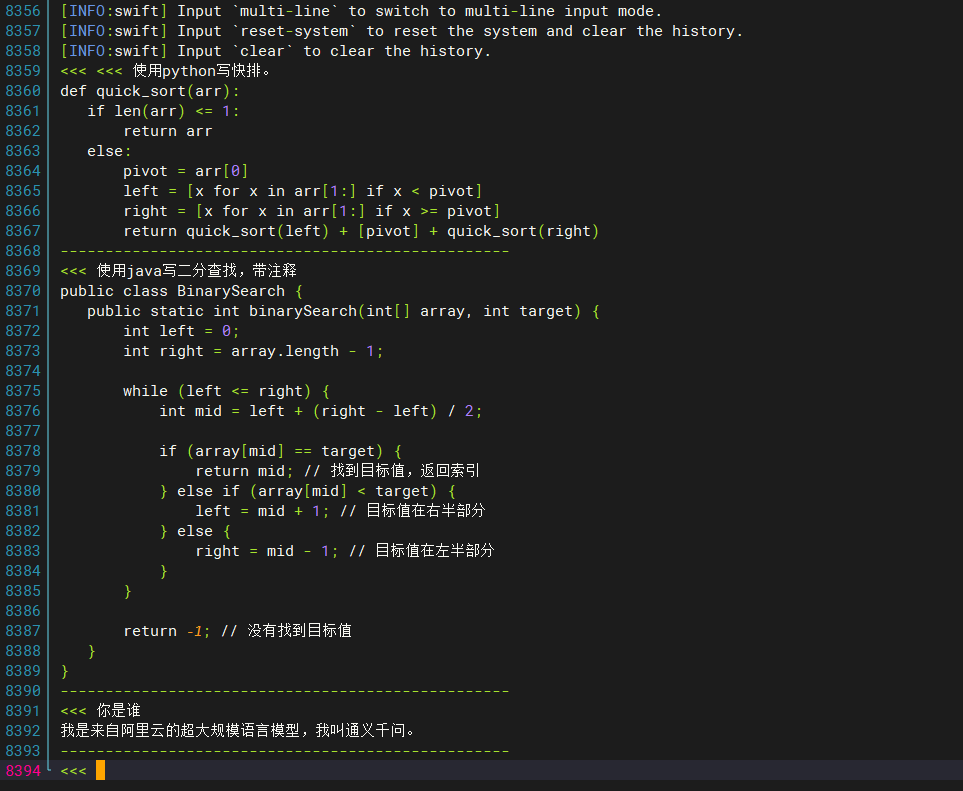
示例交互:

ModelScope旨在打造下一代开源的模型即服务共享平台,为泛AI开发者提供灵活、易用、低成本的一站式模型服务产品,让模型应用更简单!
更多推荐


 8
8 0
0- 0


 已为社区贡献1条内容

所有评论(0)